
We built a ClickUp replacement inside SharePoint, and it actually works
Nine views, a live dashboard, goals, workload tracking, and rich project notes. All inside a single SharePoint web part. No extra licenses, and no data leaving your Microsoft 365 environment.
Most Microsoft 365 organisations pay for ClickUp or Asana on top of the licenses they already own. So MStack360 built Listique360, a full project management application that runs entirely inside SharePoint as a custom web part. The data layer is SharePoint Lists, notifications use the Microsoft Graph, and nothing leaves your Microsoft 365 environment. You get nine views, a live dashboard, goals, and workload tracking for no per user fee.
- A complete project tool inside SharePoint, so there is no extra license and no separate vendor to manage
- Your data stays in your Microsoft 365 environment and inherits your Conditional Access, DLP, and Purview compliance
- A one time build your team owns forever, replacing a monthly ClickUp or Asana bill of $10 to $19 per user
Most Microsoft 365 teams are paying for project management twice
SharePoint for files. Teams for chat. Then a completely separate paid tool just to manage tasks. You already own a secure, compliant environment your IT team controls, yet the work itself lives somewhere else.
Another monthly invoice
A separate paid tool on top of the Microsoft 365 licenses you already pay for.
Data on someone else's servers
Your project data sits under another vendor's security policies, not your own.
Another vendor login
One more account to provision, secure, and offboard outside your tenant.
Another tool to adopt
One more thing your team has to learn and keep up to date.
So we built it inside SharePoint, and it does not look like SharePoint
You already have Microsoft 365. You already have SharePoint. So we built Listique360, a full project management application that runs entirely inside it as a custom web part. The left sidebar organises your Spaces, Projects, and Lists. The top bar has global search, a Create button, dark mode, and notifications. It feels like a dedicated product, because it is built to that standard.
To do 3
In progress 2
Done 30
Drag a card between columns and the status updates instantly in SharePoint Lists behind the scenes. Subtasks are supported inline, and the Done column keeps your history visible without the noise. We are managing the build of Listique360 inside Listique360 itself.
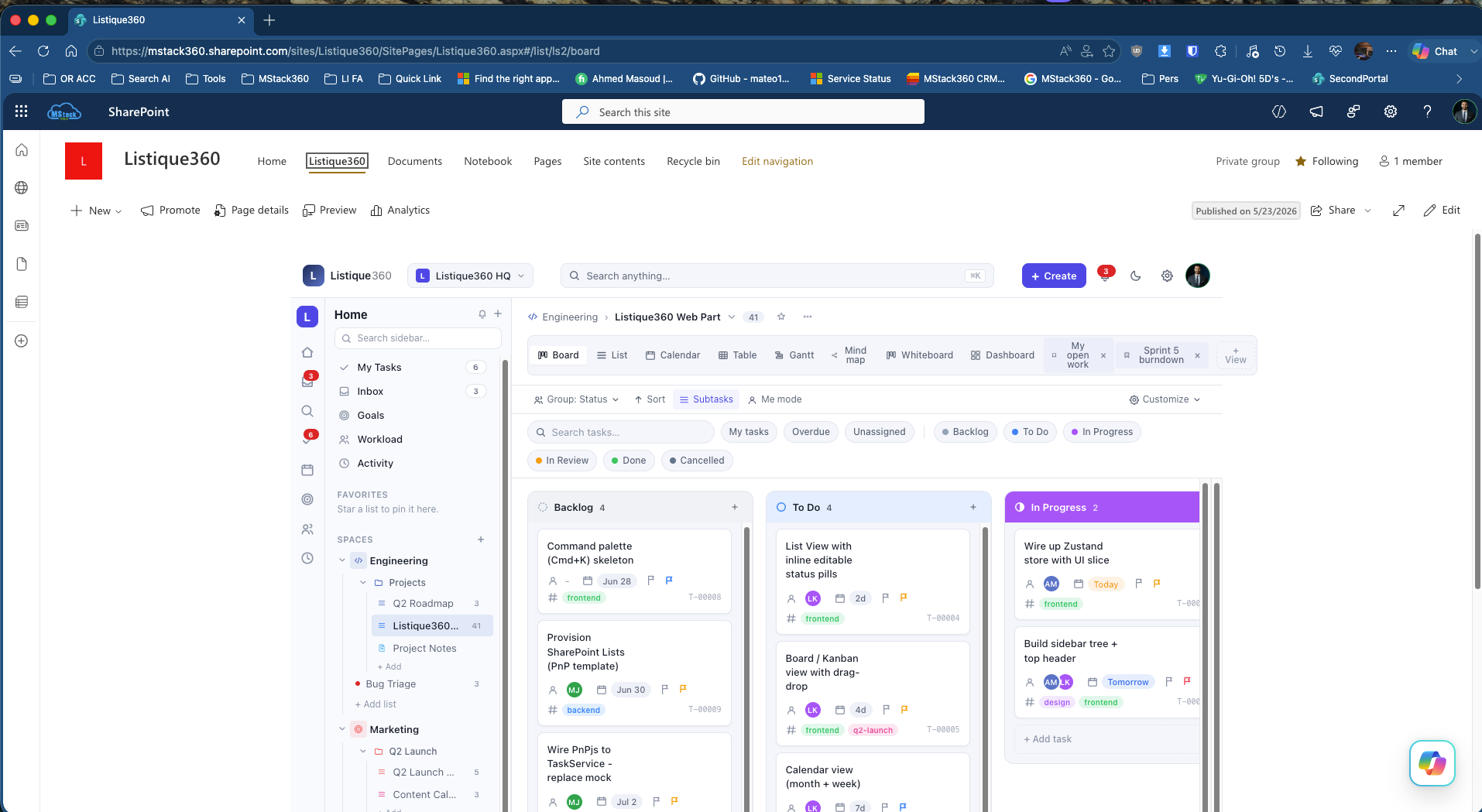
Nine views, plus saved and custom views per user
Not everyone thinks in columns. Listique360 ships with nine view types and lets each person save custom views like "My open work" or "Sprint 5 burndown" that persist for them.
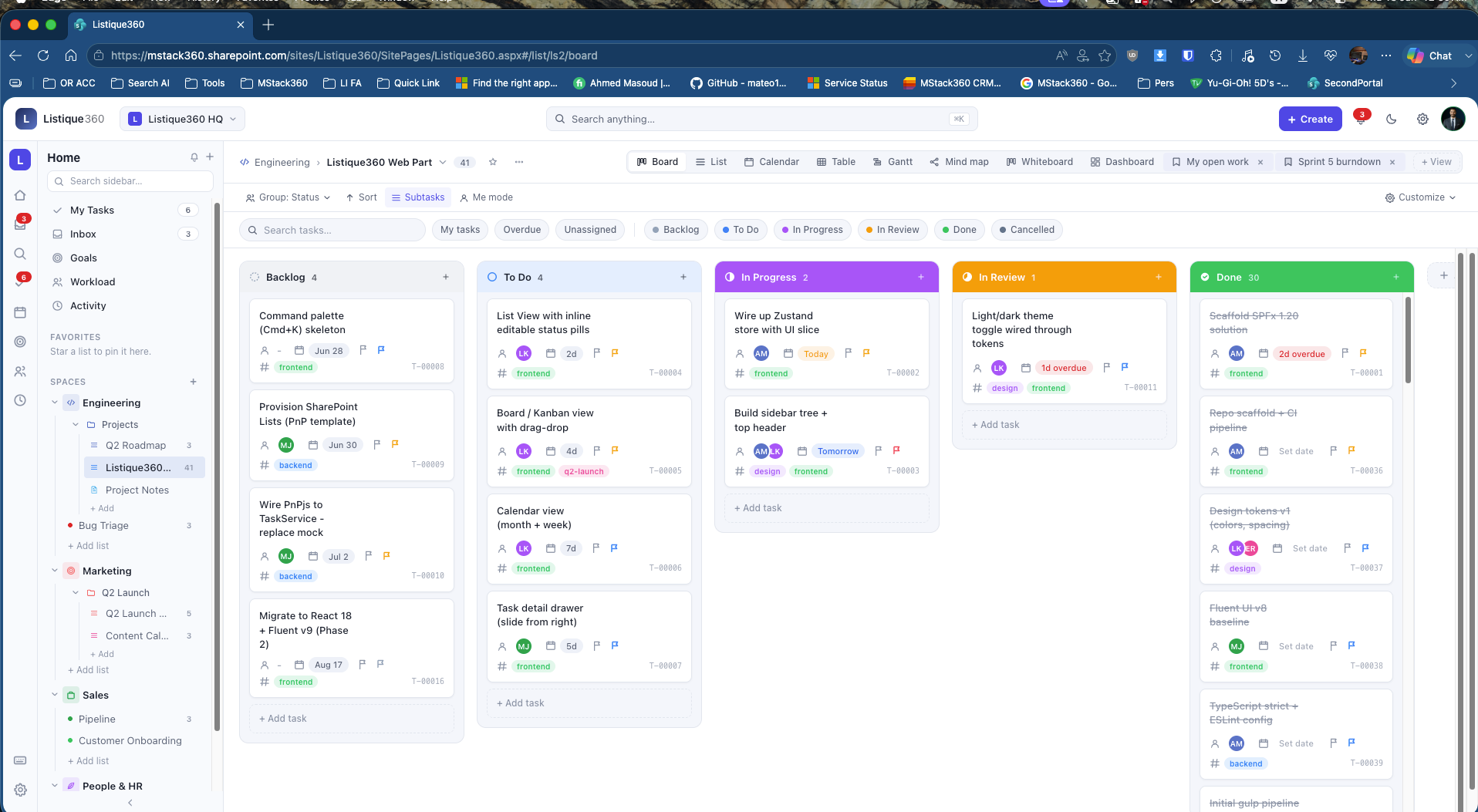
Board, with real drag and drop
Tasks flow through six status columns from Backlog to Done. Drag a card and the status updates instantly in SharePoint Lists. ClickUp and Asana charge $10 to $20 per user a month for the same thing.
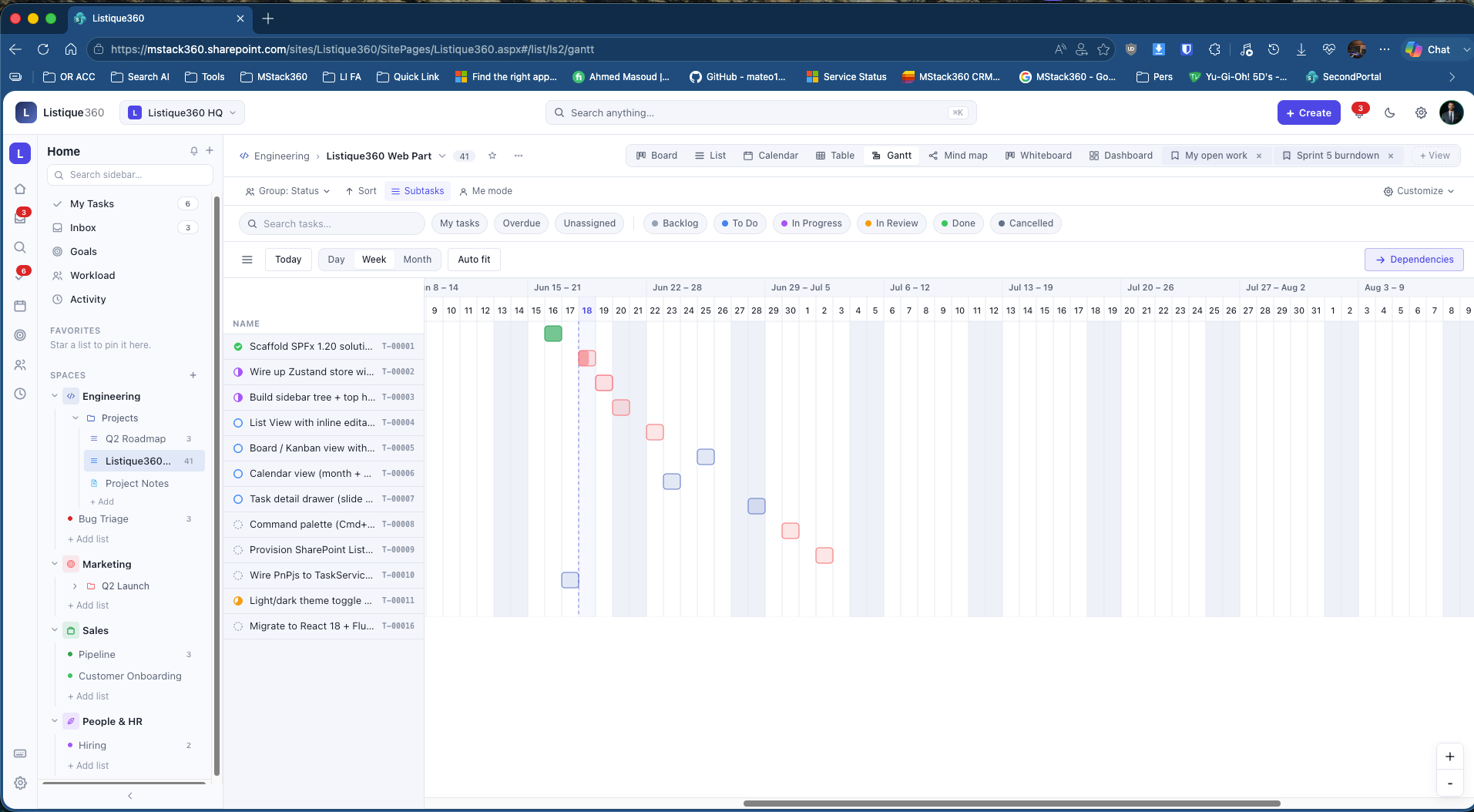
Gantt for project timelines
Every task on a horizontal timeline with day, week, month, and auto fit controls, plus dependency mapping. Our live instance runs the Listique360 roadmap from June through August.
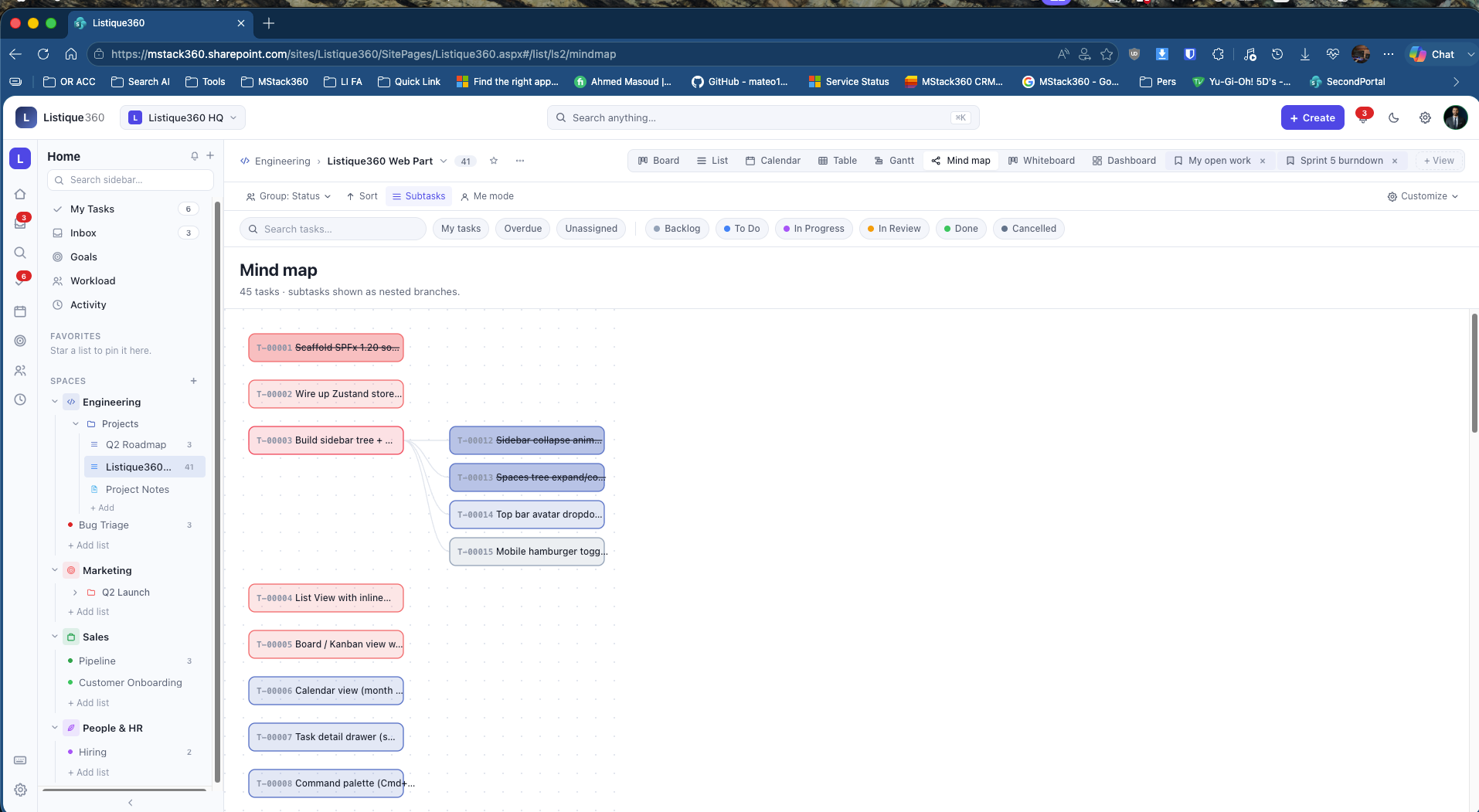
Mind map for visual thinkers
Forty five tasks with nested subtasks shown at once as connected nodes. The fastest way to see how work across a whole list is connected.
The dashboard, answers in ten seconds
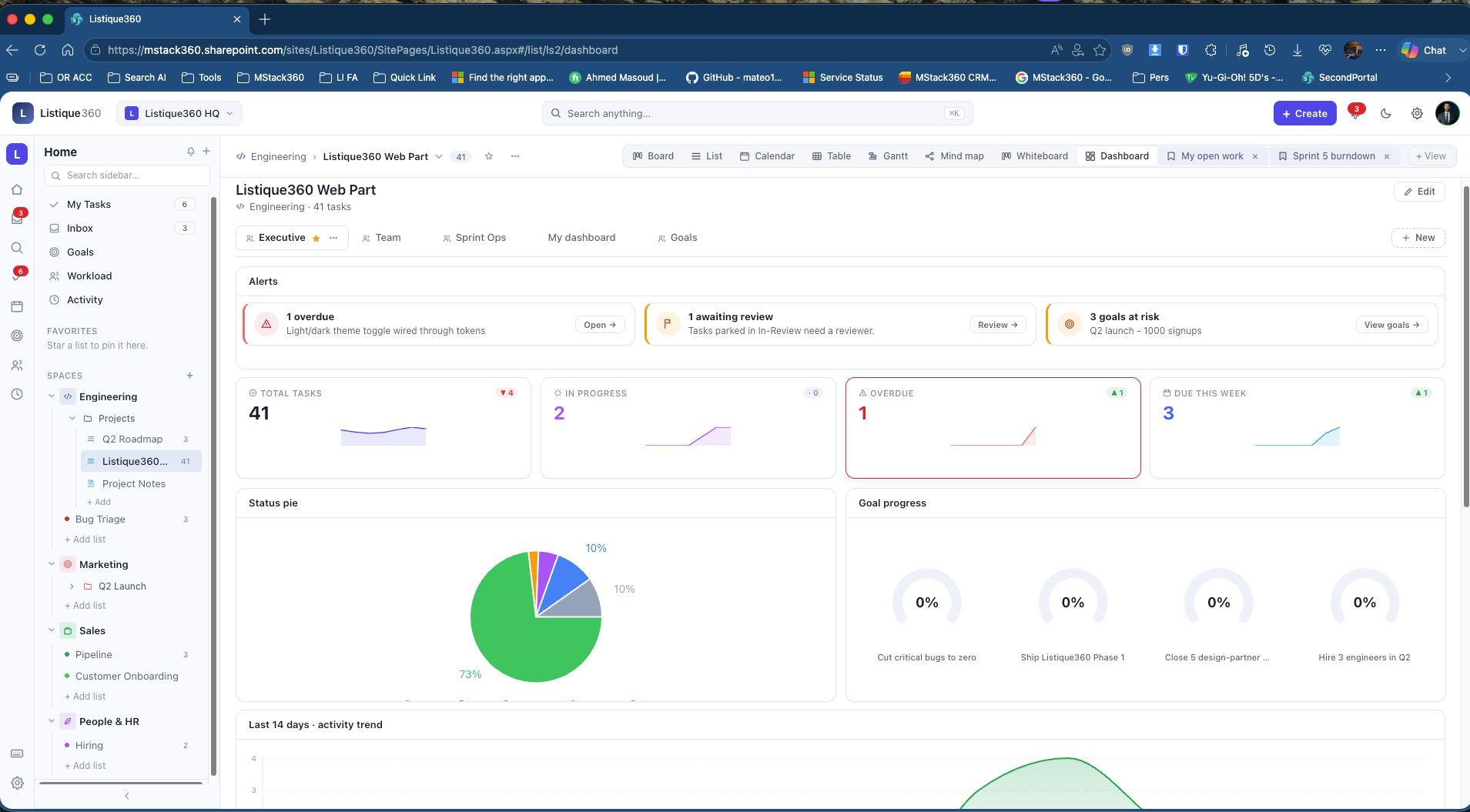
Five tabs from Executive to Goals. KPI cards, a status pie, goal progress rings, sprint burndown, and velocity. Every number live from SharePoint Lists.
A few real screens from the live instance
These are pulled straight from our own Listique360 tenant, the one we use to run the build. It is a quick look, not the full tour.

Your data never leaves your Microsoft 365 environment
This is the part most people miss. When you use ClickUp or Monday, your project data lives on their servers, under their controls. With Listique360, the data layer is SharePoint Lists and it stays exactly where the rest of your work already lives.
- Inherits your Conditional Access policies and MFA from day one
- Covered by your DLP and retention rules, and your Microsoft Purview compliance labels
- No separate login, no SSO setup, and the standard SharePoint permissions model
- No external service, no webhook to a third party, no data egress outside your tenant
For any organisation under ISO 27001, SOC 2, HIPAA, or NIS2, that difference is significant. Notifications, mentions, activity feeds, and user profiles all come straight from the Microsoft Graph and your Microsoft 365 directory.
What ships in a single web part
The math is straightforward
ClickUp Business costs $12 per user a month. Business Plus costs $19. Listique360 runs on the Microsoft 365 Business Basic license your team already needs for email, Teams, and calendar, from $6 per user a month. You are not buying anything new, just using more of what you already pay for.
Listique360 vs ClickUp, where it counts
ClickUp is a great product, and it matches us on most views. The difference is everything around the data: where it lives, what it costs, and how it fits the environment you already run.
The standard Microsoft 365 stack, nothing exotic
No external databases, no Azure SQL, no third party services. Everything runs on what your tenant already provides.
Data and platform
Frontend and state
Phase 2, and five design partners
Phase 2 brings React 18 and Fluent UI v9, a Table view with inline editing, a command palette with keyboard shortcuts, drag to rebalance in Workload, and new dashboard widgets. We are also preparing a public AppSource listing so any Microsoft 365 environment can deploy Listique360 in minutes.
Before that, we are bringing in five design partners to run it in their environment and shape the roadmap. If that sounds like your organisation, the first call is on us.
SharePoint Development
We build custom applications inside SharePoint as web parts, so your tools live in the Microsoft 365 environment you already secure and pay for. Listique360 is one of them, and we can build for your exact process too.
What people ask about Listique360
Does this really run inside SharePoint, or is it a separate app?
It runs natively inside SharePoint as a custom web part. The data layer is SharePoint Lists, notifications use the Microsoft Graph, and nothing leaves your Microsoft 365 environment. There is no external service to host or trust.
What does it cost per user?
Nothing beyond the Microsoft 365 Business Basic license your team already has, from $6 per user a month for email, Teams, and calendar. There is no per seat fee for Listique360. It is a one time build that you own forever, with no renewal and no vendor to negotiate with.
Is our data safer than it is in ClickUp or Monday?
Your project data never leaves your Microsoft 365 environment, so it inherits your Conditional Access, MFA, DLP, and Microsoft Purview compliance from day one. With ClickUp or Monday, that data sits on their servers under their controls. For ISO 27001, SOC 2, HIPAA, or NIS2 organisations, that is a real difference.
Can we get Listique360 for our own organisation?
Yes. We are bringing in five design partners before the public AppSource listing. If you run Microsoft 365 and want Listique360 in your environment, book a call and we will scope it with you.
A note from someone we work with
"Has helped with several solutions, full power apps and power automate. Always a pleasure to work with."
Want Listique360 in your environment?
Stop paying for a tool that holds your data hostage. Let us show you the same experience inside the Microsoft 365 you already run. The first call is on us.
Book a call