
We Built a ClickUp Replacement Inside SharePoint and It Actually Works
Nine views. A live dashboard. Goals, Workload tracking, and rich Project Notes. All inside a single SharePoint web part. No extra licenses, no data leaving your Microsoft 365 environment.

Most Microsoft 365 organisations are paying for ClickUp or Asana on top of their M365 licenses.
You already have Microsoft 365. You already have SharePoint. You already have a secure, compliant environment your IT team controls. So we built Listique360, a full project management application that runs entirely inside SharePoint as a custom-developed web part. No extra tools. No extra cost. Just more from what you already pay for.
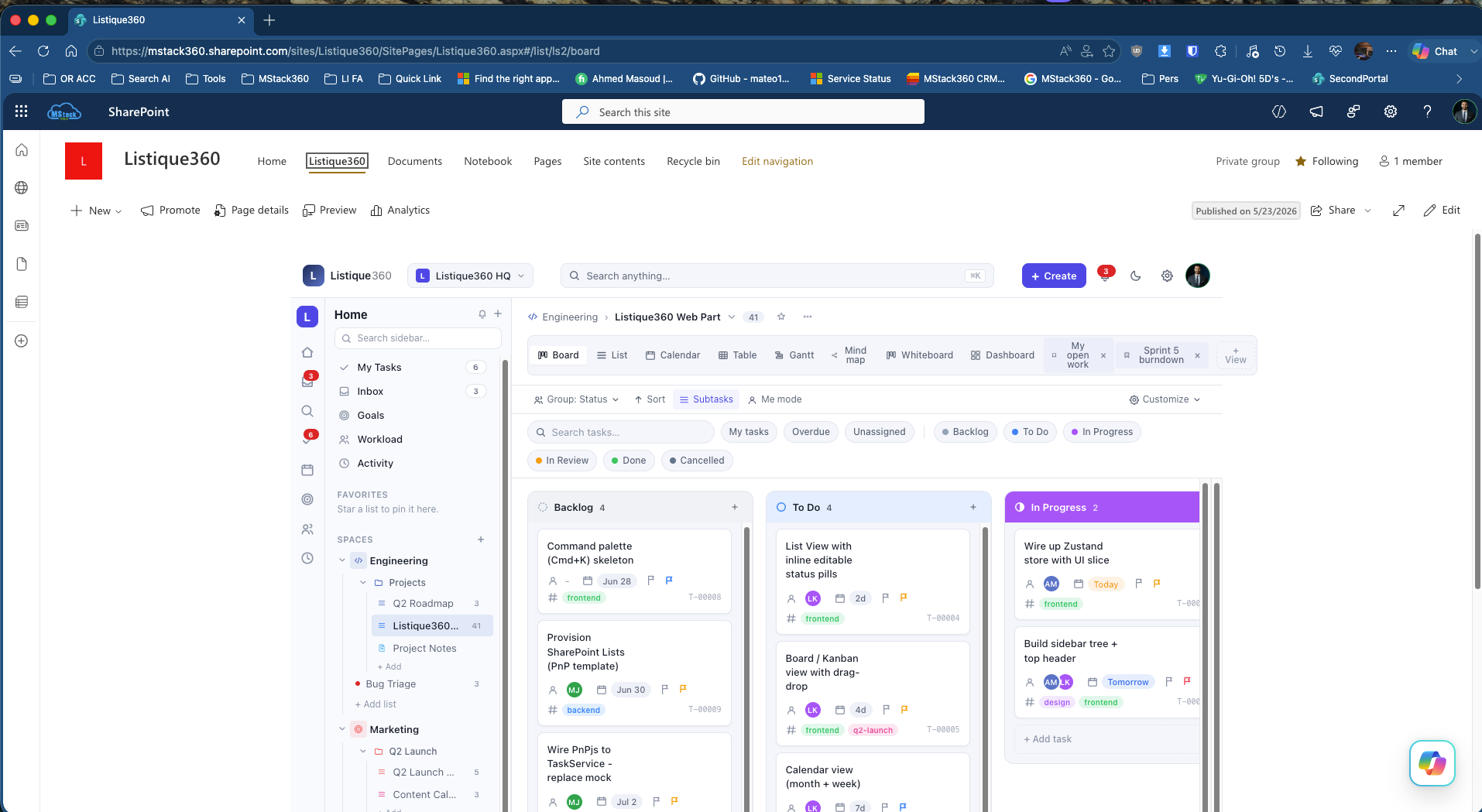
It does not look like SharePoint at all
The left sidebar organises your Spaces, Projects, and Lists. The top bar has global search, a Create button, dark mode toggle, and notifications. It feels like a dedicated SaaS product, because it is built to that standard.
The app ships with nine view types and lets you save custom views like "My open work" or "Sprint 5 burndown" that persist for each user.
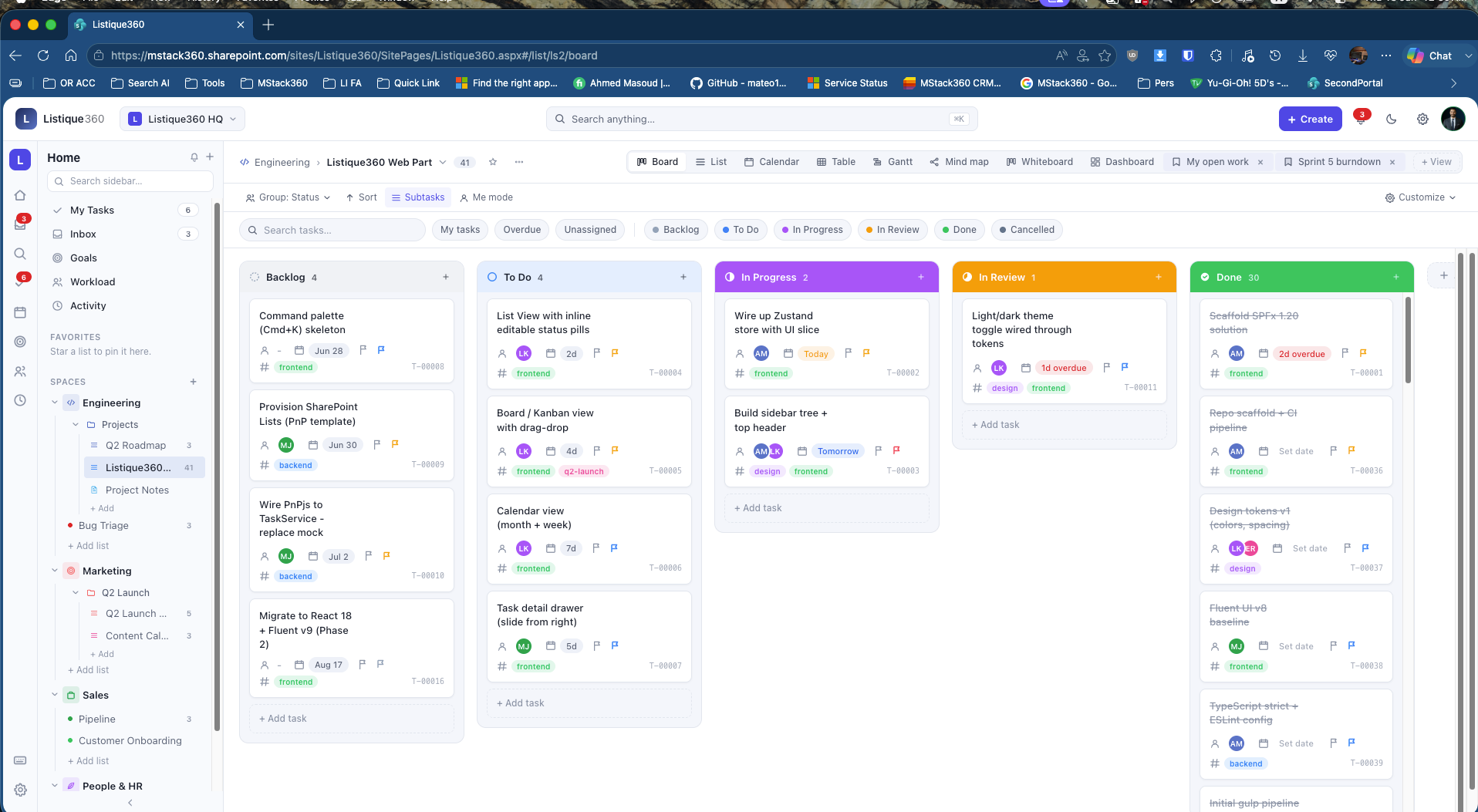
Board view, with real drag and drop
Tasks flow through six status columns: Backlog, To Do, In Progress, In Review, Done, and Cancelled. Each card shows the assignee avatar, due date, priority flag, tags, and a unique task ID.
Drag a card between columns and the status updates instantly in SharePoint Lists behind the scenes. Subtasks are supported inline. The Done column shows 30 completed tasks with a clean strikethrough so your history stays visible without creating noise.
ClickUp and Asana charge $10 to $20 per user per month for a Kanban board. Listique360 gives you the exact same experience inside the SharePoint your team already uses. One less tool, one less invoice, zero migration headaches.
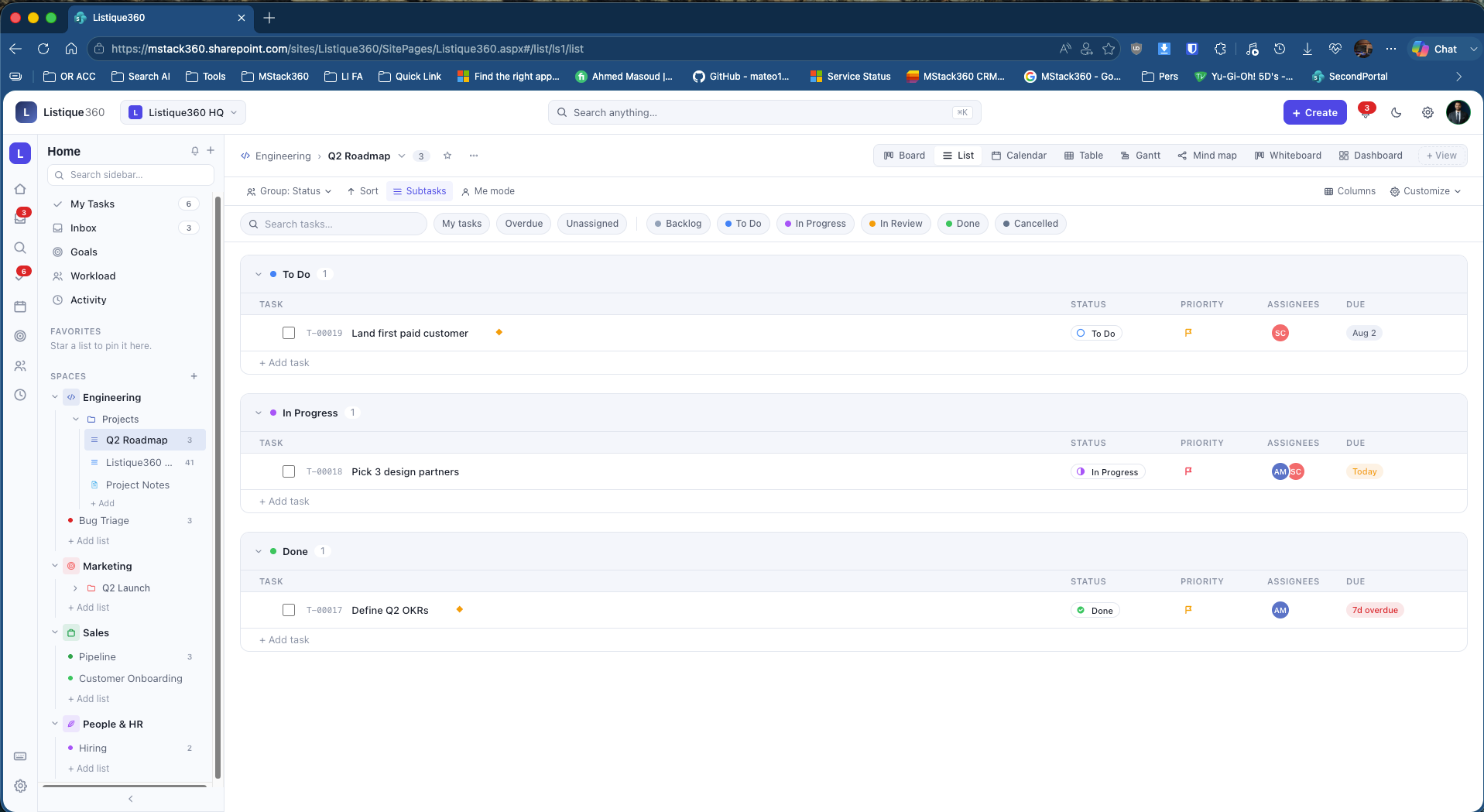
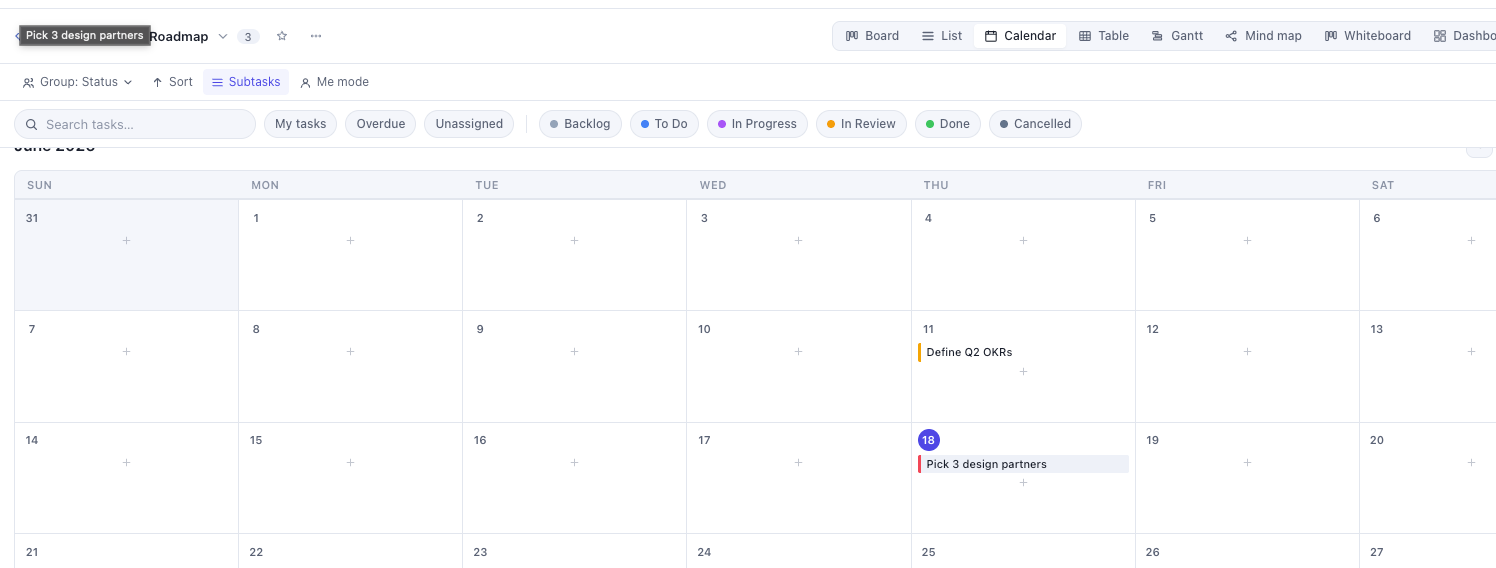
List and Calendar for every working style
Not everyone thinks in columns. The List view gives you a spreadsheet layout with Task, Status, Priority, Assignees, and Due columns grouped by status. Status pills are colour-coded and editable inline.
The Calendar view renders a full monthly grid with tasks appearing on their due dates as coloured bars. Deadline clusters become visible before they become problems. Both views read from the same SharePoint data with no sync required.
Gantt chart for project timelines
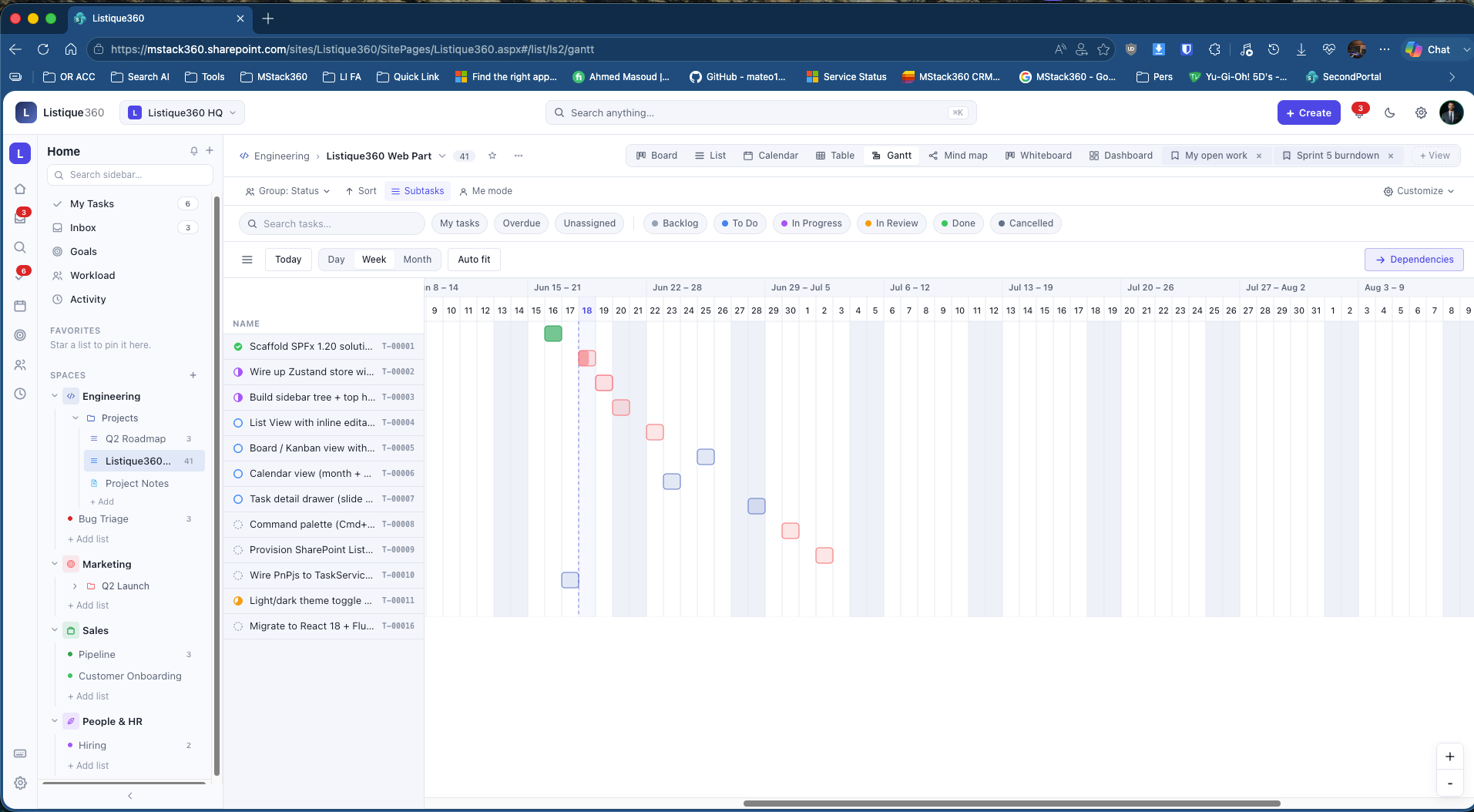
The Gantt view plots every task on a horizontal timeline with Day, Week, Month, and Auto fit controls. Task bars are colour-coded to their status. A Dependencies button maps task relationships.
Our live instance shows the full Listique360 development roadmap running from June through August. We are managing the build of this product inside the product itself.
Building a Gantt chart inside SharePoint as a custom development took less time than the average enterprise software approval process.
Mind map for visual thinkers
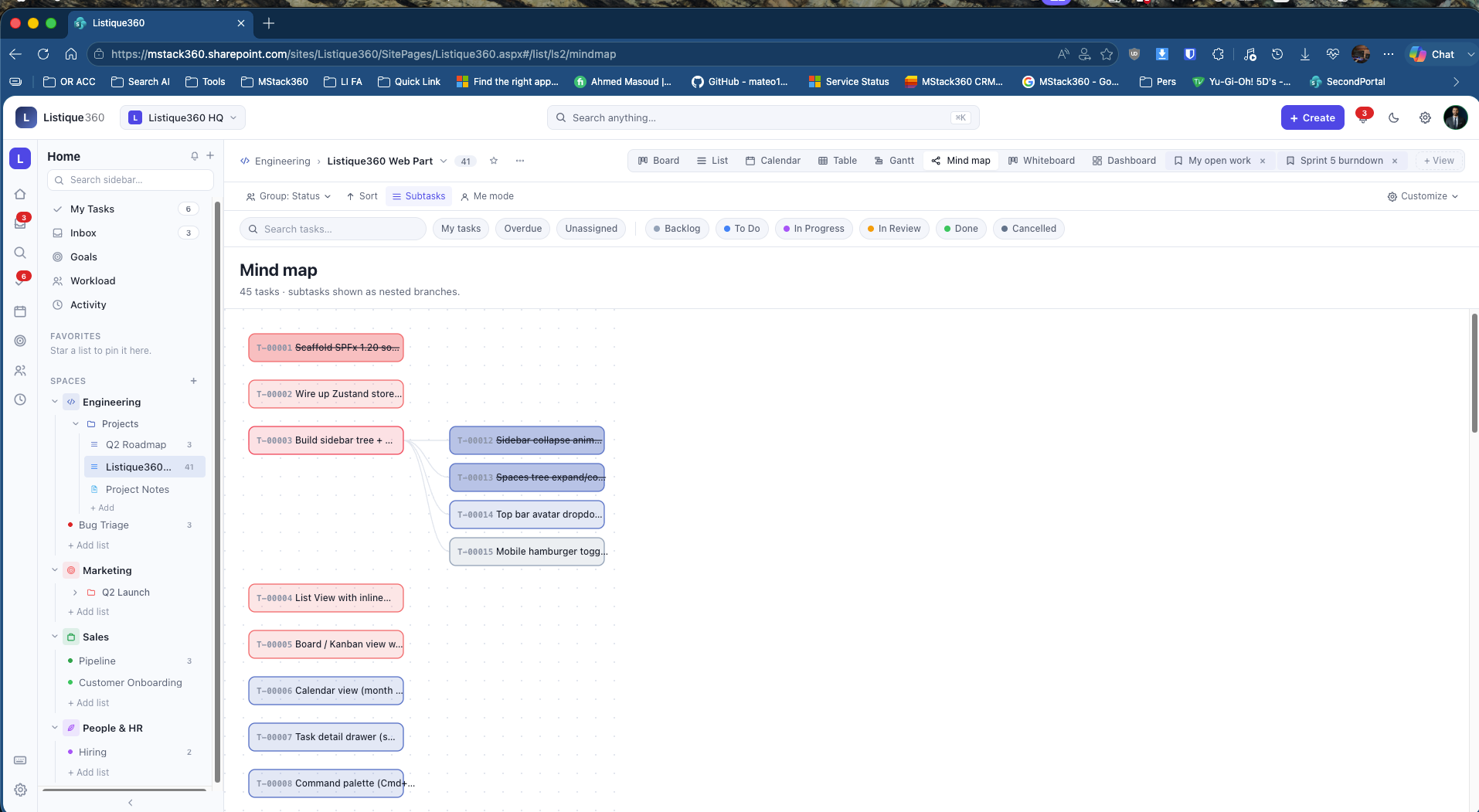
The Mind map view renders all tasks as connected node cards, with subtasks branching out as children. Forty-five tasks with nested subtasks all visible at once.
Sprint planning, brainstorming, and project scoping all feel natural here. It is the fastest way to see how work is connected across an entire list.
The Dashboard, where leadership gets their answer in ten seconds
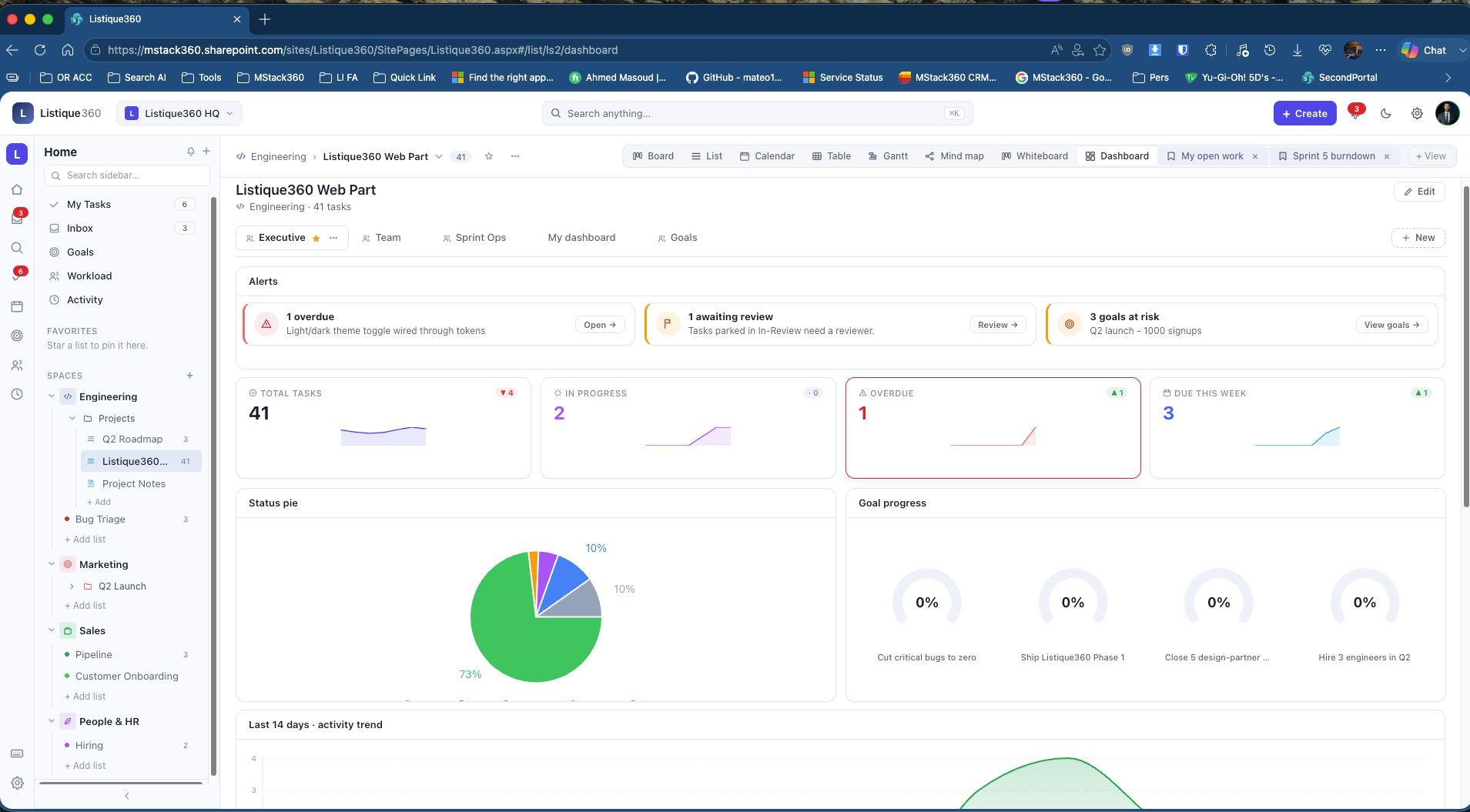
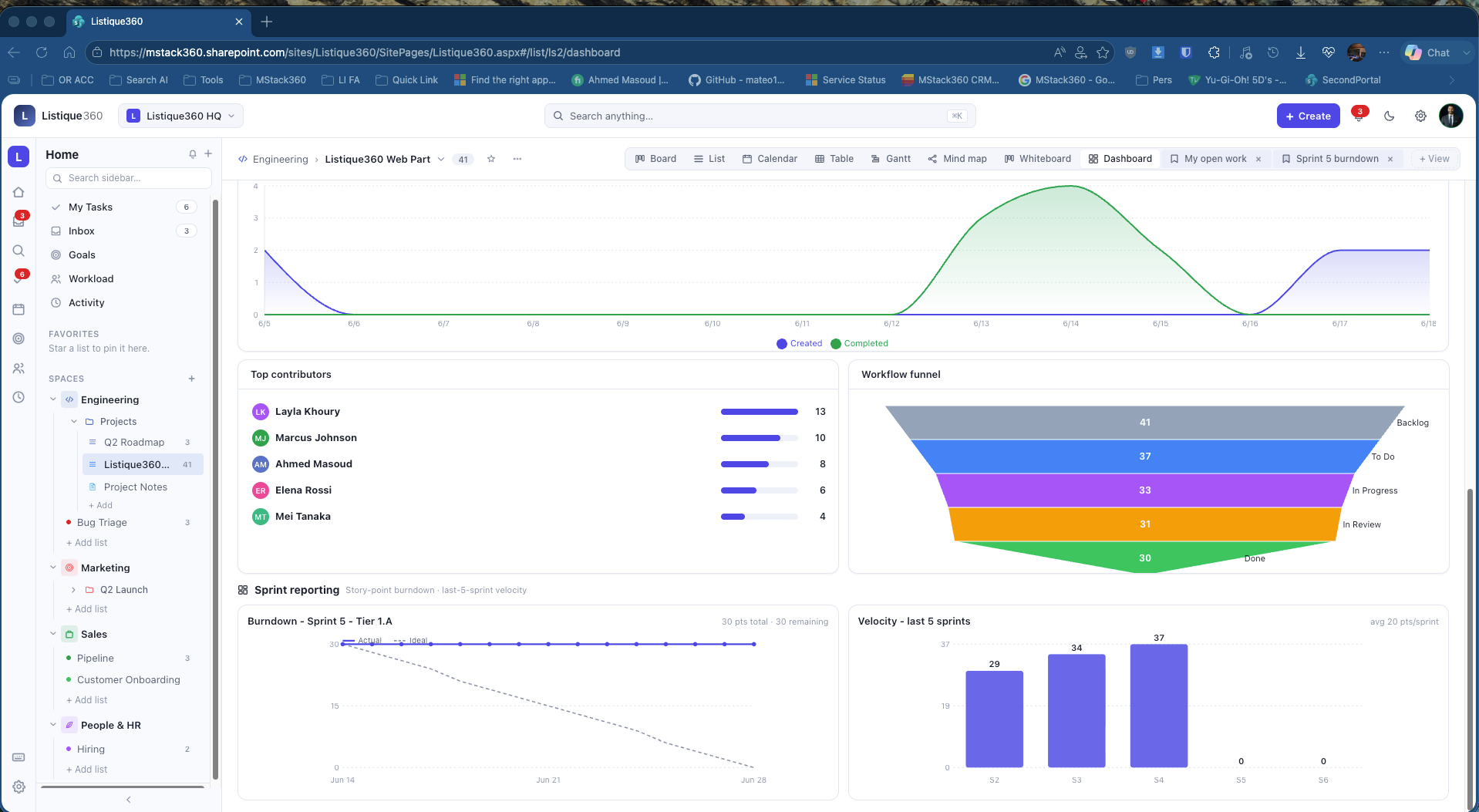
This is the view that makes people stop and say "wait, that is inside SharePoint?" Five dashboard tabs: Executive, Team, Sprint Ops, My dashboard, and Goals.
Lists
Yours forever.
Listique360 lives entirely inside your Microsoft 365 environment. The data layer is SharePoint Lists. Notifications use the Microsoft Graph. All integrations are already in place, including comments, mentions, activity feeds, and user profiles pulled directly from your Microsoft 365 directory. There is no external service, no webhook to a third party, no data leaving your Microsoft 365 environment. You deploy it once and your team owns it forever. No renewal, no per-seat fee, no vendor to negotiate with.
Goals with auto-rolled progress
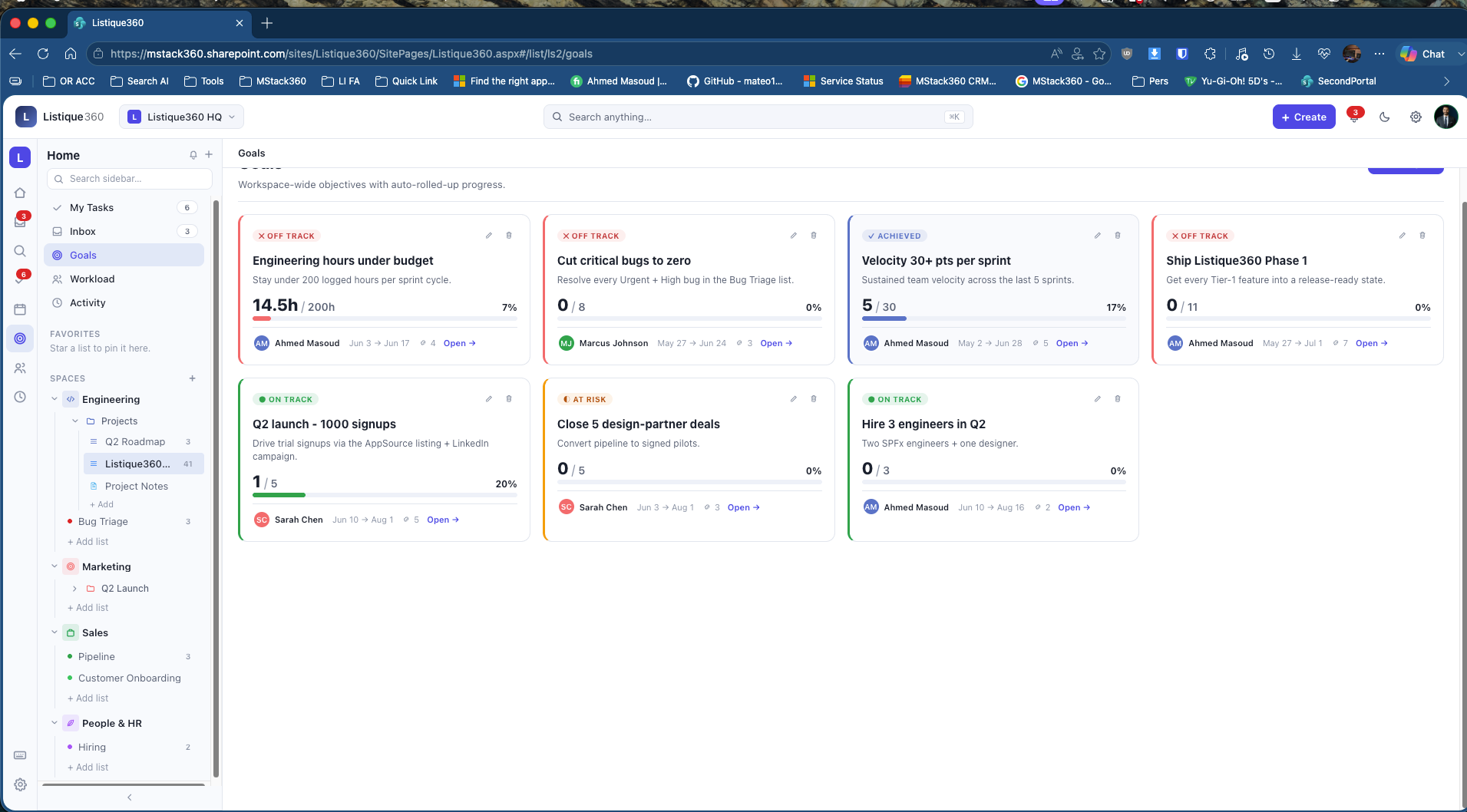
Goals are workspace-wide OKRs. Progress rolls up automatically from linked tasks. No copy-pasting numbers into a spreadsheet every week.
Your full OKR layer, inside SharePoint. No Notion, no separate goal tool, no quarterly spreadsheet that nobody updates.
Workload view, spot overload before it becomes a resignation
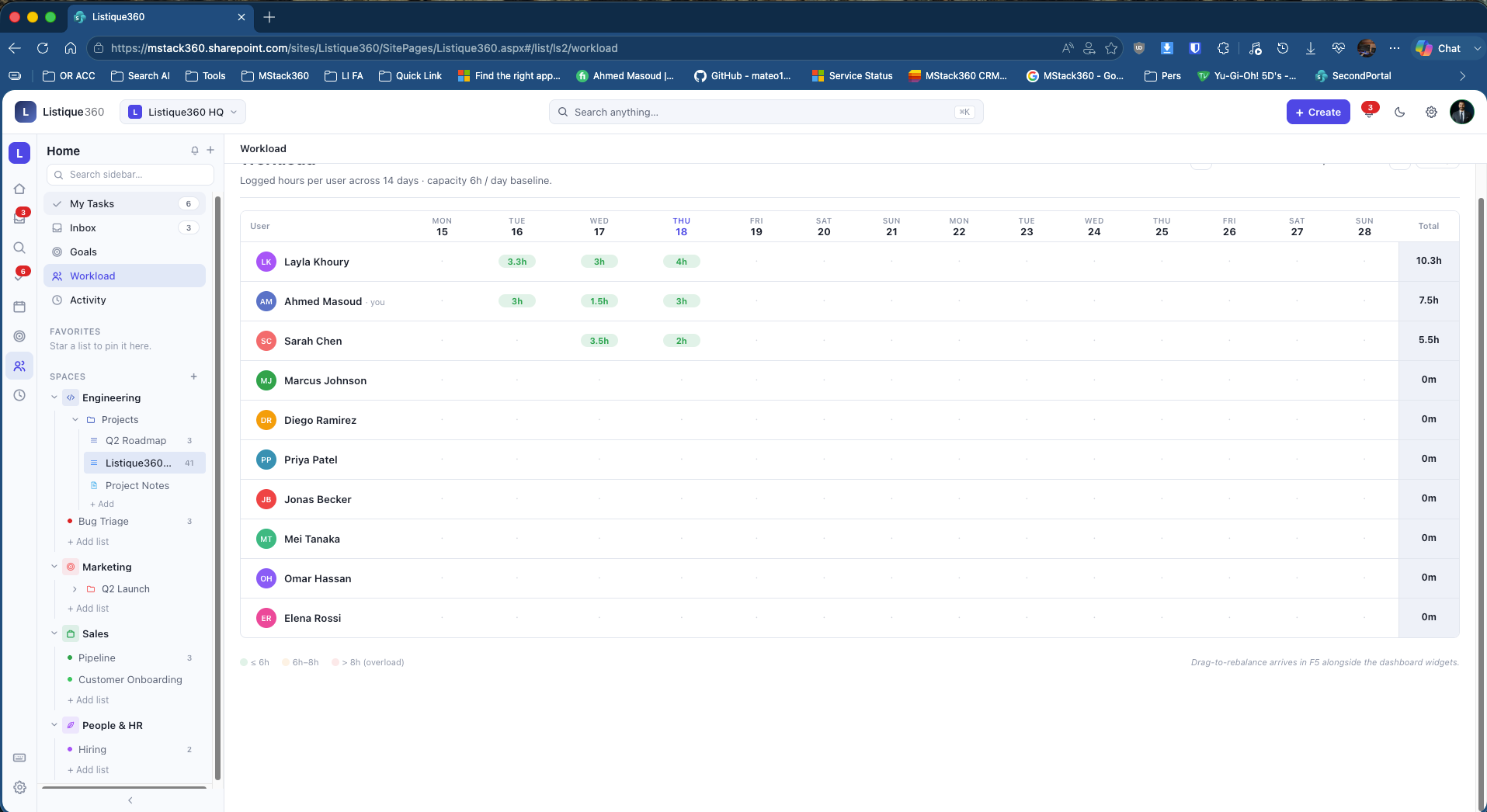
Logged hours per user across a 14-day rolling window. Managers see at a glance who is carrying too much before it becomes a problem.
Capacity baseline is 6 hours per day. Colour coding is automatic. No setup needed.
Project Notes, linked directly to tasks
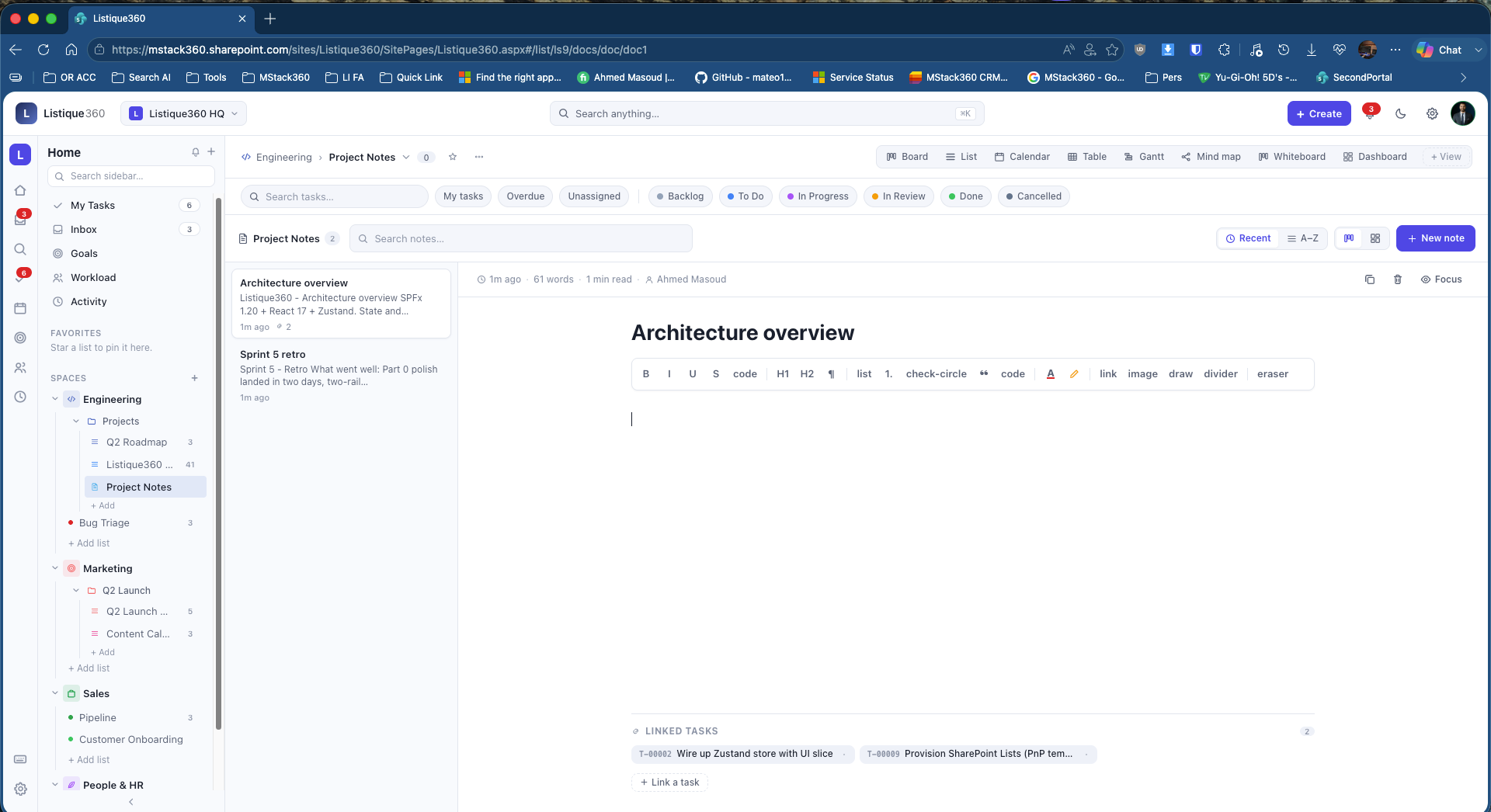
Every list has a Project Notes section with a full rich text editor. Bold, Italic, H1, H2, inline code, checklists, image embeds, and a slash command menu with Highlight, Badge, Drawing, and Embed options.
Notes link to tasks at the bottom. An architecture note can have T-00002 and T-00009 linked right there, so context and execution always live together. Sprint retros, meeting notes, and technical decisions all go here. No more lost OneNote pages or Teams chat threads no one can find later.
What it is built on
Everything runs on the standard Microsoft 365 stack. No external databases. No Azure SQL. No third-party services.
When you use ClickUp or Monday, your project data lives on their servers under their controls. With Listique360, your data never leaves your Microsoft 365 environment. It inherits your Conditional Access policies, MFA, DLP rules, and Purview compliance settings from day one. For any organisation under ISO 27001, SOC 2, HIPAA, or NIS2, that difference is significant.
What is coming next
Phase 2 includes React 18 and Fluent UI v9, a Table view with inline editing, a Command palette with keyboard shortcuts, drag-to-rebalance in Workload, and new dashboard widgets.
We are also preparing a public AppSource listing so any Microsoft 365 environment can deploy Listique360 in minutes. Before that, we are bringing in five design partners to run it in their environment and shape the roadmap. If that sounds like your organisation, reach out now.
Listique360 vs ClickUp, feature by feature
ClickUp is a great product. But every feature below is something your team already needs, and Listique360 delivers it inside the Microsoft 365 environment you already pay for.
| Feature | Listique360 | ClickUp |
|---|---|---|
| Views | ||
| Board / Kanban with drag and drop | ✓ | ✓ |
| List view with inline editing | ✓ | ✓ |
| Calendar view | ✓ | ✓ |
| Gantt / Timeline with zoom controls | ✓ | ✓ |
| Mind map view | ✓ | ✓ |
| Workload capacity view | ✓ | ✓ |
| Dashboard with configurable widgets | ✓ | ✓ |
| Whiteboard view | ✓ | ✓ |
| Activity feed | ✓ | ✓ |
| Table / spreadsheet view | Coming soon | ✓ |
| Task management | ||
| Subtasks and task hierarchy | ✓ | ✓ |
| Custom fields per list | ✓ | ✓ |
| Task relationships (blocks, related, duplicate) | ✓ | ✓ |
| Bulk actions (move, assign, status, delete) | ✓ | ✓ |
| Sprints and sprint reports | ✓ | ✓ |
| Time tracking with start / stop timer | ✓ | ✓ |
| OKR Goals with auto-rolled progress | ✓ | ✓ |
| Saved views per user | ✓ | ✓ |
| Form builder for task creation | ✓ | ✓ |
| Recurring tasks | Coming soon | ✓ |
| Collaboration | ||
| Comments with at-mention picker | ✓ | ✓ |
| File attachments | ✓ | ✓ |
| Notifications inbox with preferences | ✓ | ✓ |
| Rich text docs / Project Notes | ✓ | ✓ |
| Command palette (Cmd K) | ✓ | ✓ |
| Dashboards | ||
| 16 widget types | ✓ | ✓ |
| 5 dashboard templates | ✓ | ✓ |
| Drag, resize, and configure widgets | ✓ | ✓ |
| Sprint burndown and velocity charts | ✓ | ✓ |
| Export dashboard to PNG / PDF | Coming soon | ✓ |
| Security and data | ||
| Data stored inside your own Microsoft 365 environment | ✓ | ✗ |
| Inherits your Conditional Access policies | ✓ | ✗ |
| Microsoft Purview compliance labels | ✓ | ✗ |
| DLP and retention policies | ✓ | ✗ |
| No separate login or SSO setup needed | ✓ | ✗ |
| SharePoint permissions model | ✓ | ✗ |
| Microsoft 365 integration | ||
| Runs inside SharePoint natively | ✓ | ✗ |
| Microsoft Graph integration | ✓ | Partial |
| Teams app tab | Coming soon | ✓ |
| Outlook calendar sync | Coming soon | ✓ |
| Power Automate connector | Coming soon | ✓ |
| AI capabilities | ||
| AI Q and A grounded in your workspace | Roadmap | Partial |
| AI task generation from prompt | Roadmap | Partial |
| AI meeting notetaker to tasks | Roadmap | ✗ |
| Semantic and natural language search | Roadmap | ✗ |
| Pricing | ||
| Included in your existing M365 license | ✓ | ✗ |
| Per-user monthly cost | $0 | $10 to $19 / user |
| Data egress outside your Microsoft 365 environment | None | Yes |
| Separate vendor relationship required | None | Yes |
What you actually save over 12 months
ClickUp Business costs $12 per user per month. ClickUp Business Plus costs $19 per user per month. Both are billed annually. Listique360 runs on your existing Microsoft 365 license. The math is straightforward.
The only requirement to run Listique360 is a Microsoft 365 Business Basic license per user. That is the same license your team already needs for email, Teams, and calendar. It starts at $6 per user per month and most organisations already have it. You are not buying anything new. You are just using more of what you already paid for.
Not sure which Microsoft 365 license your team has or needs? We put together a plain-English guide that covers every plan and what it includes. Read the Microsoft 365 licenses guide here.
Want Listique360 in your Microsoft 365 environment?
We are onboarding design partners now. Get early access, influence the roadmap, and deploy it before the public launch.
Talk to us about early access Or book a call at outlook.office365.com/book/AhmedMasoud@mstack360.com