
How a logistics company automated invoice approvals with Power Automate
Invoice approvals used to live in forwarded emails. This 35 person logistics team turned them into a flow that routes itself, keeps a full history, and runs on the Microsoft 365 they already owned.
A 35 person logistics company ran invoice approvals on a fragile spreadsheet and email process. MStack360 replaced it with a Power Automate flow. It routes every invoice to the right approver, records each decision, and runs entirely on the Microsoft 365 licenses the team already owned. Phase 1 went live in days, with no new subscription and the whole solution sitting inside their own tenant.
- Invoice approvals route themselves. No more forwarding emails or retyping the same details into a spreadsheet
- A full approval history records who approved what and when. A decision is never in question again
- Built on Power Automate, already inside their Microsoft 365. No new subscription, and nothing leaves their tenant
An approval process held together by a spreadsheet and goodwill
Like a lot of growing operations, this logistics company approved invoices by forwarding emails. Someone then tracked who had signed off in a shared spreadsheet, retyping the same details every day. It worked, right up until the person who knew the spreadsheet went on vacation.
The cracks showed in the usual places. Approvals sat unread at the bottom of inboxes. Nobody could say for certain who had signed off, or when, without scrolling back through an email chain. A mistyped number was caught late, if at all. The team did not want yet another subscription, another login, another monthly fee for an approval tool. They wanted the process fixed, inside the tools they already trusted.
They thought they needed to buy an approval tool. It turned out they already owned everything they needed.
A process that runs itself, on what they already pay for
- An invoice and purchase approval process that routes itself, with no manual forwarding
- A clear, automatic record of who approved what, and when
- Notifications so approvals never get lost in an inbox again
- No new subscription, built on the Microsoft 365 licenses they already own
- A small, provable first step before committing to anything bigger
- Everything owned inside their own tenant, where their data already lives
Scoped in phases, proven before going further
Free intro call
We listened to the actual process. It was a strong fit for Power Automate, and we said so. No app needed, just smarter automation on top of what they already had.
Scoped in phases
Phase 1 was deliberately small. One approval flow, the invoice path, something they could click and judge within days. A low barrier on purpose. They could measure us by results before going further.
Built the approval flow
We created a Power Automate approval flow. It routes each invoice to the right approver, sends a notification, and records the decision with a full audit history.
Tested with real users
We ran the flow with their actual approvers and real invoices. We tuned the routing rules until they matched every real world case, then switched it on.
Handed over ownership
The flow lives in their tenant. They own it and the data behind it, even if we never work together again.
From a forwarded email to a flow that routes itself
Before, an invoice was approved by forwarding an email. Someone then retyped the details into a spreadsheet to track who had signed off. We replaced that with a single Power Automate approval flow inside their own tenant. An invoice arrives. The flow checks who should approve it. The actions fire in parallel, and the decision lands as a record nobody has to type. Here is the shape of what we built.
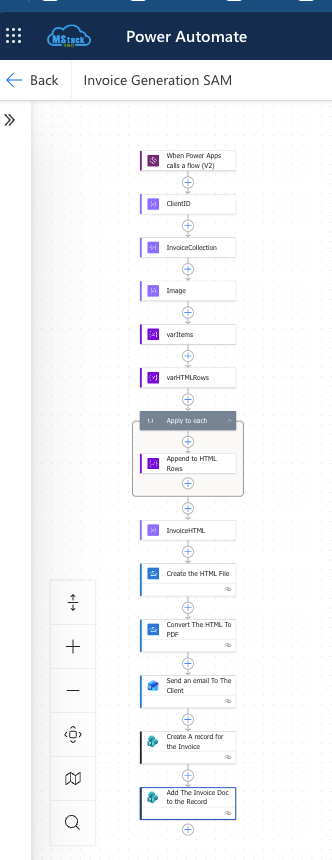
The history and data live in SharePoint Online within their own tenant. Approvers can action requests right inside Microsoft Teams. It is the same approach behind every Power Automate workflow we build, on the Microsoft 365 a client already owns.
The honest snags, all handled
The process died when one person was away
Tracking lived in a spreadsheet only one person fully understood. The whole thing stalled the moment they went on vacation.We moved the logic into a flow that runs itself, so approvals keep moving no matter who is out.
Routing rules needed tuning for real invoices
The first pass did not match every real world case the team threw at it.We tested the flow with their actual approvers and real invoices, adjusted the routing rules, then switched it on.
Approvals lost at the bottom of inboxes
Requests went unread and stalled, with no nudge to move them along.We added notifications and reminders so nothing sits unactioned and every request is surfaced.
No reliable record of who approved what
Decisions were buried in email chains, impossible to audit after the fact.We built a full approval history into the flow, so every decision is logged and auditable.
An approval process the team owns and can trust
Automatic routing
Each invoice goes to the correct approver with no manual forwarding, so the queue moves on its own.
Full approval history
Every decision is logged, so who approved what and when is never in question again.
Built in notifications
Approvers are alerted, and reminders keep nothing stuck at the bottom of an inbox.
Zero new subscriptions
The whole solution runs on Power Automate, already included in their Microsoft 365 licenses. A phased path queues purchase and other approval chains for later.
The payoff for the team
"We thought we needed to buy an approval tool. Turns out we already owned everything we needed. Now invoices route themselves, I can see exactly where each one stands, and nobody is chasing emails anymore."
Operations lead, a logistics company
Power Automate Workflow Solutions
We replace the spreadsheets, email chains, and manual handoffs that quietly cost you hours. We build approval and routing flows inside the Microsoft 365 you already pay for. Phased, provable, and fully owned by you, with nothing leaving your tenant.
What people ask about this kind of project
Do we need to buy anything new to make this work?
No. Power Automate is already part of your Microsoft 365 licensing. We build on what you own, so there is no new subscription and no extra place for your data to live.
What if we want to start small before committing?
That is exactly how we work. Phase 1 is one focused flow you can click and test within days. You judge us on results, then decide whether to expand to other approval chains.
Who owns the automation once it is built?
You do. Everything lives inside your own tenant. It is documented and yours to keep, even if we never work together again.
"I cannot recommend MStack360 highly enough. They have helped me with two projects so far, including a workflow automation using forms in Microsoft Flow, and their work is genuinely unmatched."
Stuck in a spreadsheet approval process?
Let us scope one small flow you can judge for yourself, on the Microsoft 365 you already own. The first call is on us.
Book a call