
What Teams Phone actually is
Teams Phone is a cloud based phone system built right into Microsoft Teams. There is no hardware box, no wiring, and no server rack. It is all software, which means you can get started in minutes rather than days. The most important thing to understand is that your phone number is no longer tied to a desk or a location. It is tied to you. When someone calls your business number, it rings on whichever device you are signed into, whether that is your laptop, your smartphone, or your tablet, and it uses the same number everywhere.
You are not stuck at your desk to take business calls. Work from home, a coffee shop, or a client office, and your work phone goes with you. If someone calls your office number while you are at home, it rings on your laptop, you answer with your headset, and the caller has no idea you are not at your desk. Need to step away? Transfer the call to your smartphone and keep talking as you walk.
How it replaces a traditional phone system
For decades, a business phone system meant a large box in a closet called a PBX, short for private branch exchange, that routed calls through copper wires. Teams Phone does the same job in software. Here is how the two compare.
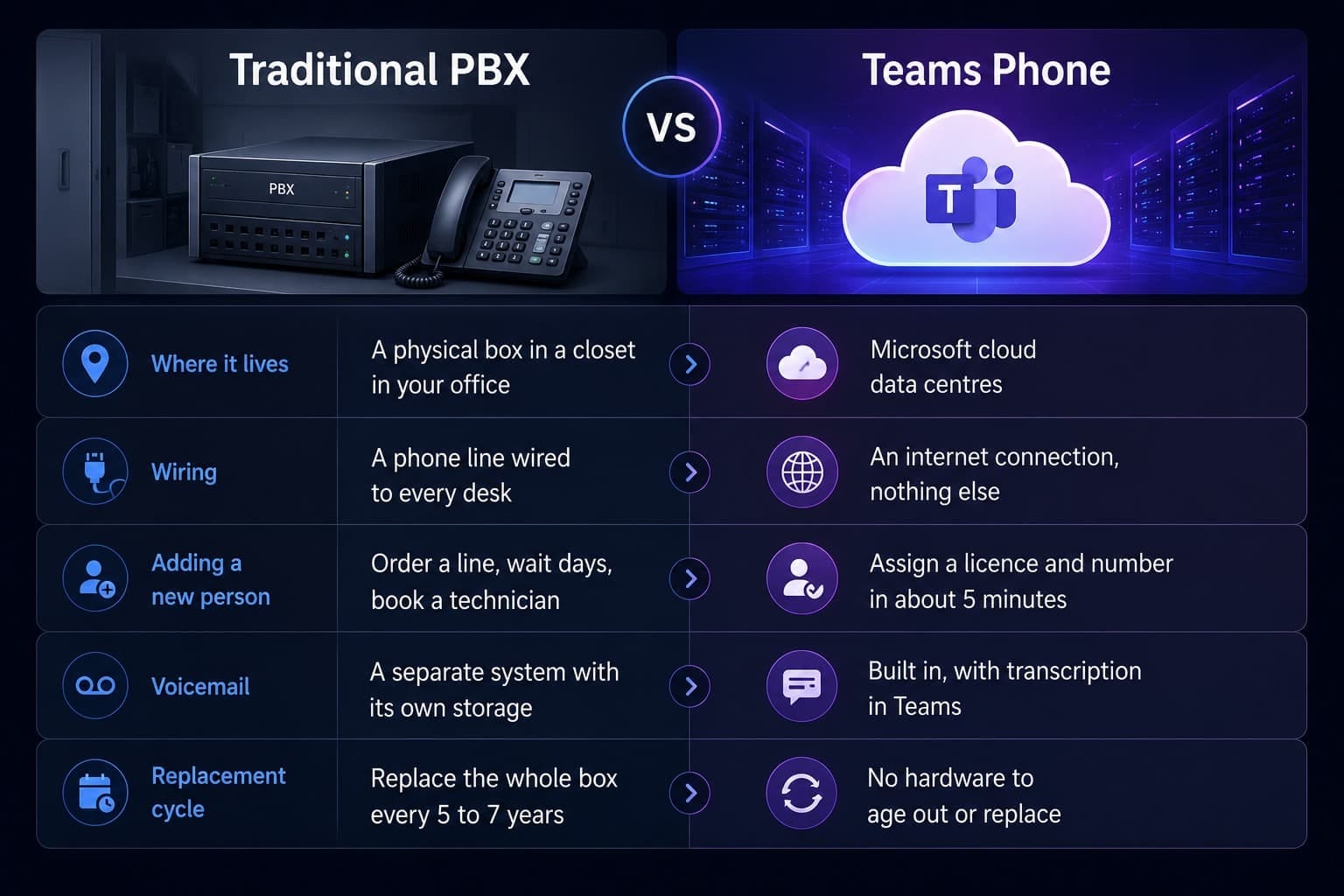
Instead of buying and maintaining your own switchboard, you rent a spot on Microsoft's switchboard. Microsoft handles the complicated parts like routing, redundancy, and security updates. You just say which users get which numbers. That means a five person company can have the same phone system capabilities as a five thousand person company, with auto attendants, call queues, and voicemail transcription all included rather than bought as extra hardware. Your phone system scales with your business, so growing from 10 people to 50 just means more licences, not a bigger box in the closet.
The three ways to connect to the phone network
Teams handles internal calls between people in your company for free. But to call a regular phone number, like a customer's mobile or a supplier's landline, you need a connection to the public telephone network, which is the network every phone in the world is connected to. Microsoft gives you three ways to get there.
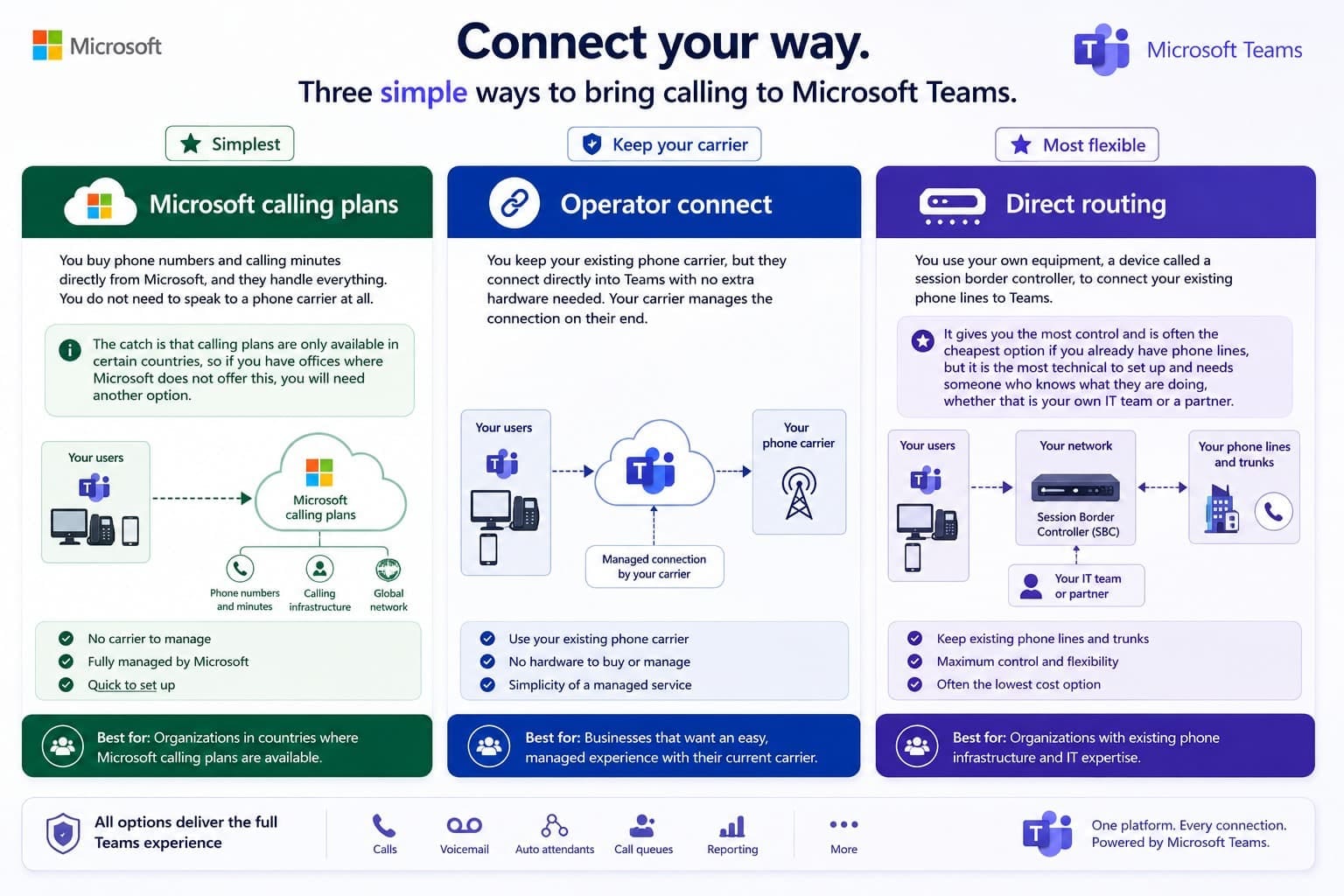
A small business in the US might pick Microsoft calling plans for simplicity. A global company might use operator connect to keep local carriers in each region. A business that already has phone lines and a good carrier relationship might choose direct routing to save money. Do not let the technical names scare you, and know that a good partner can pick the right one for your situation. You do not need to become an expert on session border controllers.
Licensing and costs, simplified
If you already have Microsoft 365, you are partway there because Teams is included in your subscription. But calling is an add on, and you need two separate pieces to make it work: a phone licence to unlock the phone system features, and a way to connect to the phone network, which is one of the three options above.
1. A Teams Phone licence
This unlocks the phone system features like making and receiving calls, auto attendants, and voicemail. It costs roughly 8 to 10 US dollars per user each month. If you already have an E5 licence, this is included, so you do not need to buy it separately.
2. A way to connect
On top of the phone licence, you add one of the three connection options. A Microsoft calling plan runs roughly 8 to 15 US dollars per user each month depending on the minutes you need. Operator connect and direct routing are often cheaper per minute but have different pricing structures.
If you have a Microsoft 365 E5 licence, the phone system is already included, so you do not need a separate Teams Phone licence. If you have E3 or Business Premium, you will need to add the Teams Phone licence yourself. You can check this in the Microsoft 365 admin centre under billing, and it takes about two minutes. Note that even with E5, the phone system does not include the calling connection, so you still need one of the three options above to call regular phone numbers.
How does this compare to the old way? A traditional on premise PBX costs roughly 15 to 25 US dollars per user each month once you factor in hardware, maintenance contracts, and phone lines, and that is before the thousands of dollars of hardware you buy up front. Teams Phone is often 30 to 60 percent cheaper. For a 10 person company, Teams Phone might cost 150 to 250 US dollars per month in total, while a traditional PBX for the same company could easily run 300 to 500 US dollars per month plus the up front hardware.
The true cost can be two to three times the headline licence price once you add calling minutes, international calling, and support. Do not just look at the 10 dollar number and assume that is your total. Get a full quote before you decide, and remember to factor in your internet connection, since Teams Phone needs good internet to work well and you may need to upgrade a slow or unreliable line.
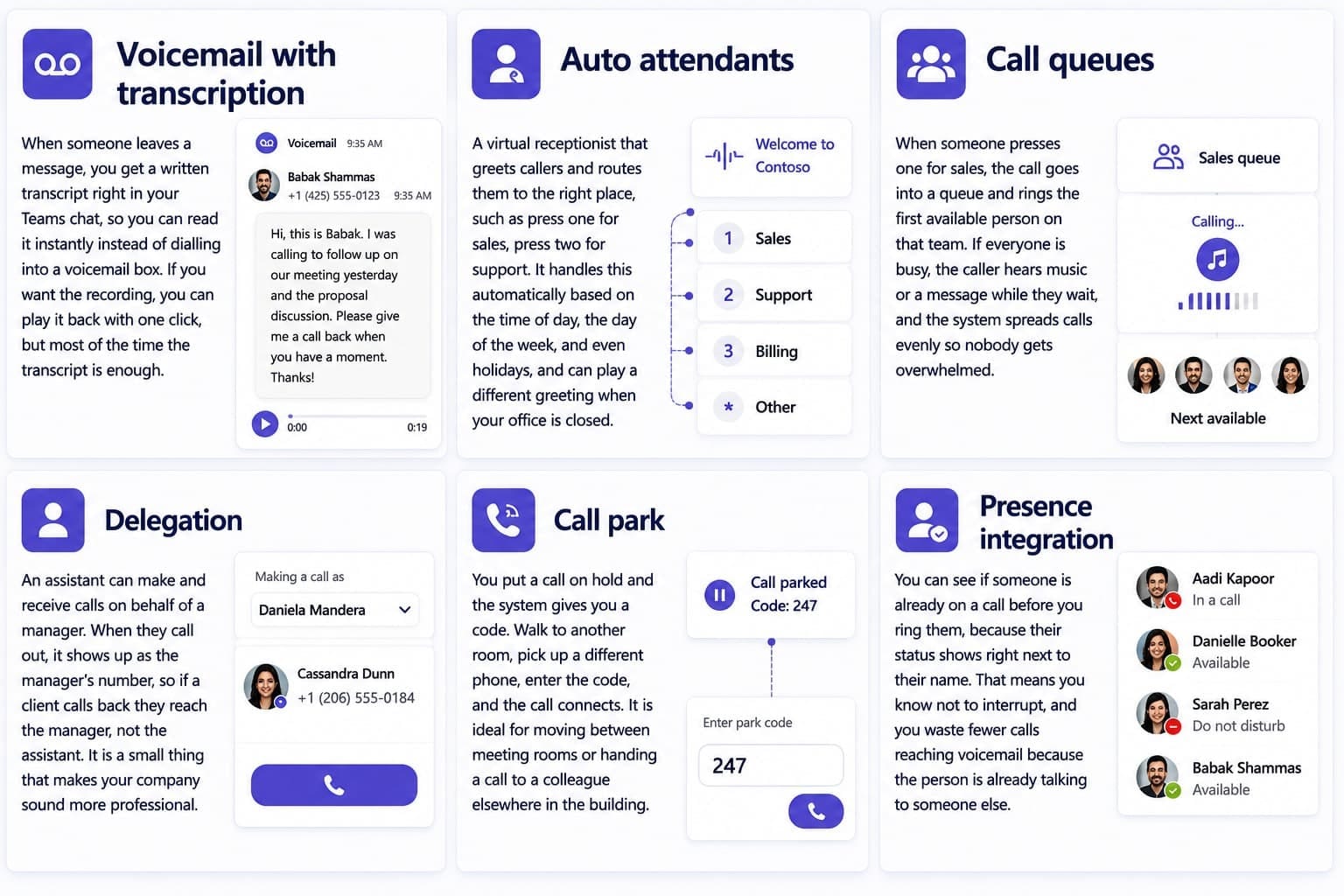
A small law firm with three lawyers can set up an auto attendant on their main number where callers press one for the first lawyer, two for the second, and three for the third. If nobody answers, the call goes to voicemail and the lawyer gets a transcript in their Teams chat, then calls back from their laptop or phone. No receptionist, no extra hardware, no separate voicemail system, and it all works inside the app they already use for email and meetings.
Security and reliability
Moving your phone system to the cloud can sound risky. What if it goes down, or someone listens in on your calls? Those are fair questions, and here is how Microsoft handles them.
- Encryption in transit. Every call is scrambled as it travels between you and the other person, using the same security standards as online banking. For one to one calls, you can turn on end to end encryption so that not even Microsoft can listen in.
- 99.999 percent uptime. Microsoft targets a level of uptime that works out to less than five minutes of downtime per year. Because calls run across multiple data centres, if one goes down another takes over automatically, which a single box in your office cannot match.
- Identity protection. Teams uses your Microsoft 365 login, so if you have multi factor authentication turned on, your phone system is protected by the same security. Someone cannot simply pick up a desk phone and make calls as you, because they need your credentials and your second factor.
- Compliance built in. Teams Phone supports standards like HIPAA for healthcare and GDPR for privacy. Recording and archiving are included, so if you are in a regulated industry you can record calls, store them securely, and produce them for audits without buying separate software.
Your phone system is now as secure as the rest of your Microsoft 365 environment, so you do not need a separate security setup for your phones. The same policies that protect your email and files also protect your calls. In practice the cloud version is often more secure than an old on premise system, because Microsoft has security teams and infrastructure most small businesses could never afford on their own.
How all the pieces connect
Teams Phone is not one single thing. It is a cloud PBX, a connection to the phone network, and a set of features, all wrapped in the Teams app you already use for chat and meetings. Here is how a single incoming call flows through the system from start to finish.
A customer calls your main number
The auto attendant answers automatically and plays your greeting, with no person needed to pick up.
The caller chooses an option
They press one for support, which sends the call into the right call queue for that team.
The queue rings the first available agent
It rings on the agent's laptop. If that person is already on another call, the system rings the next available person instead.
If everyone is busy, the caller waits
They hear music or a message on hold while the system keeps trying to connect them to someone.
If nobody answers, voicemail takes over
The call goes to voicemail, the system transcribes the message, and the transcript lands in your Teams chat.
You read the transcript and call back
You see who called and what they wanted, then call back from your laptop or phone. No missed calls, no lost messages.
The magic is not any single feature. It is how they all connect. The auto attendant does not need someone to transfer calls, the call queue does not need someone to watch who is available, and voicemail does not need someone checking a separate inbox. It all just happens, so you do your job and the phone system handles the rest.
Consultation to go live in 5 simple steps
Your journey to modern communication, structured, transparent, and fast.
Discovery call
We understand your needs and team structure in a focused 30 minute consultation. No pressure, just clarity.
Custom plan
A tailored proposal with pricing and timeline, delivered within 24 to 48 hours. Exactly what you need, nothing you do not.
Setup and configuration
We build your phone system in the background while you focus on business. Typically 2 to 5 days.
Number porting
Seamless migration of your existing numbers, coordinated with your carrier. Zero downtime, zero disruption.
Training and handoff
Comprehensive team training and complete documentation. Your team owns it confidently from day one.
Ready to modernise your business phone system?
Stop wasting money on outdated phone systems. We check what your current licence already includes, recommend the connection option that fits your business, and build you a modern cloud based solution in just days.
- Free 15 minute intro call
- No upfront costs for setup
- Live in 1 to 2 weeks