From Anywhere to Microsoft 365: The Full MStack360 Journey

From Anywhere to Microsoft 365: The Full MStack360 Journey

Be honest. Take a moment and think about how work really happens inside your business today.

Tools: How many tools are your teams using right now to do one job?
Files: How many different places do your files live?
Approvals: How often do approvals happen inside chats?
Lost time: How many times did someone say “I cannot find it” this week?
Devices: How many devices are working outside your control?

And the real question:
Is your IT helping your business grow, or is it just keeping things from breaking?

If any of this feels familiar, you are not alone. Most companies come to us in the same situation. Not because they are careless, but because growth usually happens faster than structure.

At MStack360, we take clients from literally anywhere to Microsoft 365. And we do it as a full journey, not a one-time migration.

So let me ask you something

If you could redesign your business operations from scratch today, what would you fix first?

  • Files and collaboration
  • Security and compliance
  • Device management
  • User support
  • Workflow speed
  • Reporting and visibility

Keep that answer in mind while you read, because this is exactly how we approach the journey.

Step 1: Discovery That Feels Like a Business Audit

Before tools, we start with reality. Not assumptions, not diagrams, not what should be happening. We focus on how work actually flows inside your business today.

Where work happens: Where does work actually happen across teams and tools?
Delays: Where do approvals, handoffs, or decisions slow everything down?
Mistakes: Where do errors repeat because processes are unclear or manual?
Risk: Where does sensitive data get shared casually without real controls?
Workarounds: Where do people build their own systems just to get work done?

One question that reveals everything

If you disappeared from your business for one week, would operations still run smoothly, or would everything depend on specific people and their personal systems?

We map processes, stakeholders, and risks, then turn that reality into a clear, actionable plan.

Step 2: Migration Without Chaos

You already know migration can go wrong. When it does, productivity drops fast and trust is lost.

Emails disappear
Permissions break
People lose files
Teams become messy
Productivity drops

So ask yourself: if your migration happened next month, do you trust your current provider to deliver it with zero downtime and zero confusion?

Tenant setup and identity strategy
Mailboxes, files, Teams, and SharePoint structure
Pilot group first, then controlled rollout
Validation before and after cutover
Clear communication so users are not surprised

Migration is not the goal. Continuity is.

MStack360 Microsoft 365 Migration Service

This is not a copy-paste migration. We treat migration as a business-critical operation, designed to protect users, data, and momentum.

  • Zero-downtime focused approach
  • Business-aligned tenant and identity design
  • User-friendly rollout with real communication
  • Post-migration validation and stabilization

Step 3: Onboarding That Creates Adoption

Let me ask you this. When a new employee joins your company, do they know exactly where to work, where to store files, and how to collaborate on day one?

Most companies do not. So we design onboarding that is role-based, practical, and removes guesswork instead of adding more tools.

Leadership onboarding
Clear visibility, decision points, and collaboration standards from day one.
Department onboarding
Where work lives, how teams collaborate, and how files are structured.
End-user onboarding
Simple guidance that helps people work confidently without asking IT.
Teams & SharePoint templates
Consistent structures that scale as the business grows.
Rules that remove guesswork
Clear standards so people stop inventing their own systems.

Access is easy. Adoption is everything.

Quick win question

If you looked at your Microsoft Teams environment right now, would you say it is structured and scalable, or chaotic and growing randomly?

If the answer is chaotic, this is a fix we handle early.

Want to see what “good” looks like before you migrate?

MStack360 can run a Microsoft 365 readiness assessment and show you:

  • What to fix now
  • What to migrate first
  • What risks exist today
  • What the roadmap should be
Book an assessment

Step 4: Security That Matches Real Risk

Security is not about fear. It is about control.

Let me ask you directly.

If someone logs into your environment from a new country at 2 AM, what happens?

Do you get alerted?
Does access get blocked?
Or do you only find out after damage is done?

We implement Microsoft security properly using Entra ID and Conditional Access, aligned to how your business actually works.

Strong authentication
Multi-factor authentication that protects without slowing users down.
Conditional Access
Access decisions based on risk, location, and device compliance.
Least privilege
Users and admins only have what they truly need.
Secure admin model
Admin access separated, protected, and monitored.
External sharing strategy
Collaboration without losing control of sensitive data.
Email protection
Phishing and malware defenses that actually reduce incidents.

You will feel the difference immediately.
Less risk. More confidence.

Step 5: HIPAA and ISO Alignment

If you handle health data, client data, or regulated information, this is not optional.

If an auditor asked tomorrow,
“Show me who accessed what, when, and why”

Could you prove it in minutes?
Or would it become a stressful week?

We align your Microsoft 365 environment with HIPAA-style and ISO 27001-style controls by focusing on real, defensible pillars.

  • Access controls and identity governance
  • Audit logs and retention planning
  • Secure internal and external sharing rules
  • Device compliance and enforcement
  • Documentation and evidence readiness
  • Monitoring so controls stay active over time

We do not sell buzzwords.
We build defensible setups.

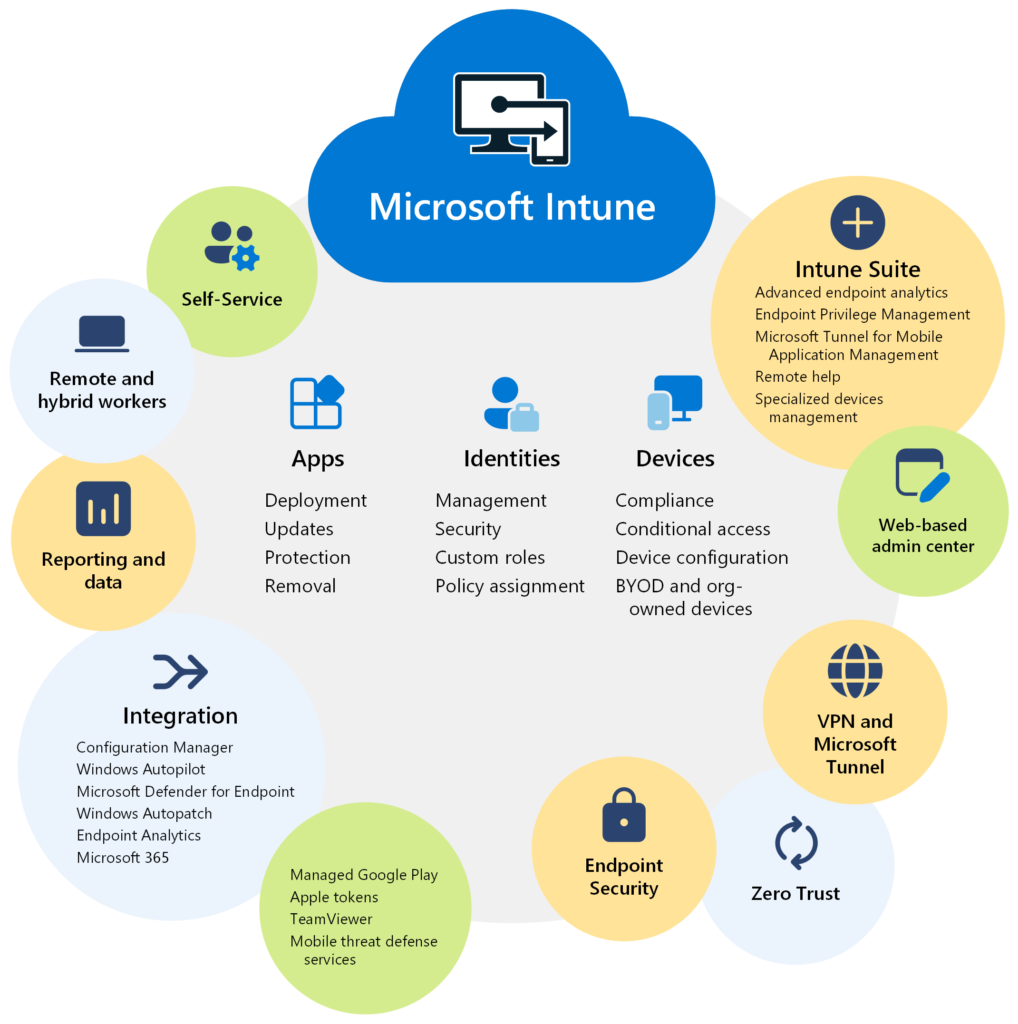
Step 6: Device Management With Intune

what-is-intune
Source: MS Learn

Here is a tough question.
How many devices access your company data today that you do not really control?

Personal laptops
Mobile phones
Old or unmanaged Windows machines
Shared or temporary devices
Lost devices that still have access

This is where security stops being theoretical.
Devices are where data actually lives.

Bringing devices into a secure baseline

  • Device enrollment and compliance enforcement
  • Encryption and endpoint protection
  • Application deployment and update control
  • Lost device response and access revocation
  • Standard configurations that reduce support tickets

Most Intune environments fail not because the tool is weak, but because it is deployed without a clear operating model.

Our approach: device policies aligned to identity, access rules, and real user behavior — so protection stays invisible and productivity stays intact.

This is where control becomes measurable, and where security finally supports the business instead of slowing it down.

Step 7: Stakeholder Support That Feels Executive

Stakeholders do not need technical noise.
They need clarity, direction, and confidence.

Ask yourself this:

Do your leaders currently have visibility into security, adoption, and productivity?

Or do they only hear about IT when something breaks?

We support stakeholders with information that helps them make decisions, not chase problems.

Clear priorities and timelines
So leadership understands what matters now and what comes next.
Risk and compliance visibility
Not fear, just facts that support responsible decisions.
Adoption trends
Real insight into how tools are actually being used.
Automation opportunities and ROI
Where time and cost can realistically be reduced.
Dashboards for regular reviews
Simple summaries for weekly or monthly check-ins.

This is how IT stops being a support function
and becomes part of business strategy.

Step 8: End User Support That Protects Productivity

End users do not want tickets.
They want work to continue.

How many hours did your team lose last month because of
“small IT issues”?

We provide support that fixes problems and reduces repeats.

Fast response when issues block work
Permission and access fixes
Device troubleshooting under management
User onboarding and offboarding
Knowledge base to prevent repeat issues

Support is not only reactive.
It is operational stability.

Step 9: Workflow Optimization and Digitization

Now the fun part.
Where are you still using spreadsheets for processes that should be systems?

Approvals
Requests
Tracking
Contracts
HR forms
Client onboarding

Ask yourself:
If your business doubled in size, would your current workflow survive?

Step 10: Automations That Remove Busywork

Automation is not about being fancy.
It is about giving time back.

Approvals and reminders
Follow-ups and notifications
Data syncing between systems
Escalations when things stall

We build Power Automate flows that are measurable, stable, and owned by the business — not locked behind IT.

Step 11: Dashboards That Turn Work Into Decisions

Let me ask you something simple.
Can your leadership see what is happening without asking five people?

We build dashboards that show the truth, not noise.

Operational KPIs
Clear signals on how work is actually moving.
Workflow throughput
Where things flow smoothly and where they slow down.
Support trends
What keeps breaking and what is improving.
Security posture signals
Visibility without panic or micromanagement.
Executive summaries
Decision-ready views for leadership reviews.

Visibility reduces stress.
And it improves decisions.

Step 12: Auditing and Monitoring That Keeps It Strong

Most Microsoft 365 environments do not fail in one day.
They drift.

Permissions quietly grow.
Policies get bypassed.
Devices become non-compliant.
Sharing becomes risky.
Teams become messy again.

The question is not if drift happens.
It is whether you catch it early.

We provide ongoing auditing and monitoring to keep the environment healthy.

Access reviews and privilege hygiene
Permission and sharing oversight
Device compliance monitoring
Security and policy alerting
Regular review cycles
Continuous optimization recommendations

The Result: A Full Microsoft 365 Journey

Clients come to us from anywhere.
They leave with a Microsoft environment that actually runs the business.

  • A platform users understand
  • Security stakeholders trust
  • Managed and compliant devices
  • Digital workflows instead of manual work
  • Automations that save real time
  • Dashboards that drive decisions
  • Ongoing monitoring to keep it strong

Final question.
If you could fix one thing in your operations next month, what would it be?

Now imagine fixing the whole system, step by step.
That is what we do.

The Result: A Microsoft 365 Environment That Actually Works

Clients come to MStack360 from all kinds of setups. Some are messy. Some are half-built. Some are holding together by habits and heroics.

They leave with a Microsoft 365 environment that is designed to support the business, not slow it down.

  • A platform users understand and trust
  • Security stakeholders feel confident defending
  • Devices that are managed, compliant, and recoverable
  • Digital workflows instead of spreadsheets and emails
  • Automations that remove real busywork
  • Dashboards that turn activity into decisions
  • Ongoing monitoring so things stay strong over time

Final question.

If you could fix one thing in your operations next month, what would it be?

Now imagine fixing the whole system — step by step — without disrupting the business.

That is the MStack360 journey.

Leave a Comment

Your email address will not be published. Required fields are marked *